

I never believed AI could write good content.
I still don’t.
Ninety-nine percent of what gets labeled “AI-generated” is generic, shallow, and interchangeable with every other article ranking for the same query.
Feed any AI tool a title and a blank prompt and you get the statistical average of everything it’s ever read.
That’s not a writing problem. That’s an input problem.
Here’s what changed my thinking about the process: I found a workflow that consistently produces drafts worth publishing.
It doesn’t start with a clever prompt.
It starts with research, structured SERP data, competitor outlines, and a brief detailed enough that Claude knows exactly what to write before it writes a single word.
The article you’re reading was produced using that workflow.
In this piece, you’ll learn:
- Why most AI content fails before the first sentence is typed
- The three-step workflow: thruuu for intelligence, Claude Code for execution, a human for the final 20%
- The two files that turn Claude into a disciplined SEO writer
- Where the “(almost perfect)” ceiling is, and who has to clear it
Ready? Learn how I write SEO content with Claude.
April 2026 update: The Claude Writer has been rebuilt with a multi-agent architecture. Six specialized agents now handle research, writing, humanizing, link placement, and final review. I also added a knowledge/ folder where you can drop your own notes, data, or quotes before running.
Table of Contents
Why most AI content fails before you write a single word
Give ChatGPT, Gemini or Claude a blank prompt and it will write you an article.
It will write the same article for every other marketer who asked the same question…
Same structure, same generic subheadings, same obvious points. The output reflects the average of the internet, which is, by definition, average.
The problem is not the LLM. These language model can write well.
The problem is what most people give it: no competitor analysis, no keyword research, no search intent data, no heading structure, no brand voice. Just a title and an expectation.
Garbage in, garbage out.
This applies to AI as much as it applies to any other content creation process.
The fix is not a better prompt. A prompt is still a blank canvas with words on it.
The fix is a structured brief built from live SERP data, the kind of input that tells ChatGPT or Claude what’s actually ranking, what questions people are really asking, and what structure Google Search is already rewarding.
Claude SEO skills or a Claude Code agent: which should you use?
So before the walkthrough, we should discuss the difference between Claude Skills or Claude Agent.
What a Claude SEO skill actually does
A skill is an instruction sheet for one task.
You install a folder with a SKILL.md file in it. Anthropic’s docs describe three levels of loading: the name and description always in context, the instructions when a task matches, the scripts and templates only if that run needs them.
Here some examples of SEO skills you can install today:
That last one describes itself as 25 sub-skills and 18 sub-agents.
So let’s speak about agents now.
What a Claude Code agent does differently
An agent is a worker you hand a goal to. It runs the job start to finish in its own context window, with its own tools.
Out of the box, Claude Code is one session working through one conversation. A team is something you set up.
Here’s the one I run and that we will describe from the next section: six agents, one job each. Research, research strategy, writing, humanizing, link placement, final check.
You hand in a brief and get back a draft.
Which one fits the job you have
For simple tasks, I recommend going for Skills.
When you start to build multi-steps processes where each step requires a lot of effort, I would rather build a team of agents.
And this is exactly, what we are covering now.
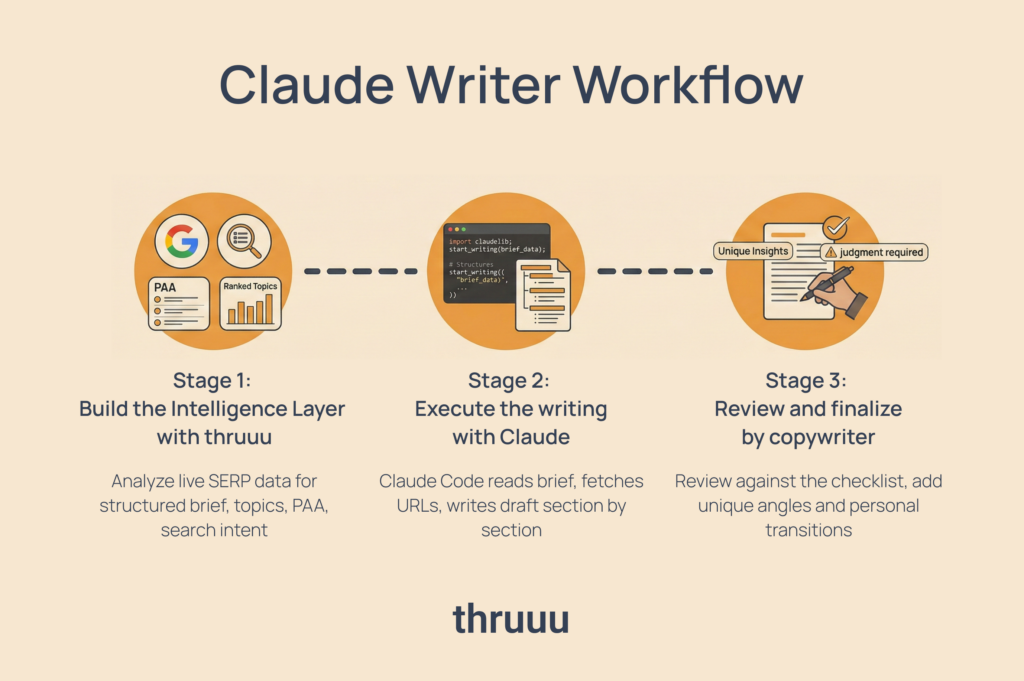
The Claude Writer workflow at a glance
The full workflow has three stages. Each one eliminates a different failure point.
Stage 1 — Build the intelligence layer with thruuu
thruuu analyzes the top 100 Google results for your target query and packages them into a structured content brief.
You get competitor outlines, top topics ranked by frequency, People Also Ask data, search intent classification, and internal and external link suggestions, all from live SERP data.
Stage 2 — Execute the writing with Claude Code
Claude Code reads the brief through a set of persistent instructions, fetches all referenced URLs, follows the exact heading structure from the brief, and writes the draft section by section.
No improvisation on structure. No ignoring the brief.
Stage 3 — Review and finalize by you
You review the draft against a structured checklist Claude produces at the end.
You add the 20% that requires judgment: unique data, personal observations, transitions that require lived experience, and any claim that needs a verified source.
That’s the system. Each stage feeds the next.
Watch the video below or read through all the steps.
How to get started with thruuu Claude Writer
Set up Claude Code with the right instructions
Claude Code is Anthropic’s command-line tool that runs Claude as an autonomous agent, capable of reading files, fetching URLs, and executing multi-step tasks from a single instruction.
I use Claude Code specifically because of how precisely it follows complex, structured instructions. That discipline is what makes the workflow reliable.
The setup lives in the thruuu claude writer GitHub repo. Just clone it or download the folder.
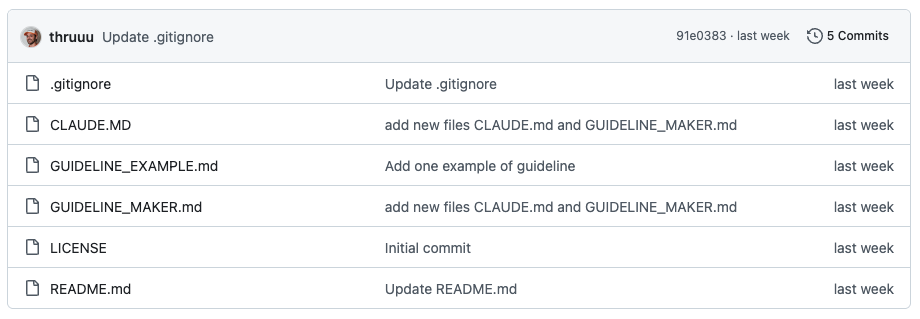
It contains two important files that do all the work.
CLAUDE.md — the agent brain
CLAUDE.md is the file Claude reads automatically every time it starts a new session.
It defines the complete workflow:
- how to parse every element of a thruuu brief,
- what to do with URLs before writing,
- how to handle Top Topics keywords,
- how to detect the article language,
- how to place internal and external links naturally,
- and how to produce a final review checklist at the end.
Every step is explicit. Every rule is written out.
Claude doesn’t guess. It follows instructions.
The key distinction: this is not a prompt. A prompt is something you write once and paste in.
CLAUDE.md is a persistent instruction set that applies the same logic to every brief, every time.
GUIDELINE_MAKER.md — your guideline assistant
GUIDELINE_MAKER.md runs once. It interviews you about your brand, your audience, your writing style, your tone, and your taboos.
Then it fetches URLs from your blog and analyzes your actual writing patterns.
This is where it gets interesting. Most people describe a writing style they aspire to, not the one they actually produce.
GUIDELINE_MAKER.md flags contradictions between what you say you do and what your content actually does, then builds a GUIDELINE.md that reflects both.
The result is a personal style guide Claude loads automatically for every draft including voice, tone, forbidden phrases, AI visibility settings, entity density targets.
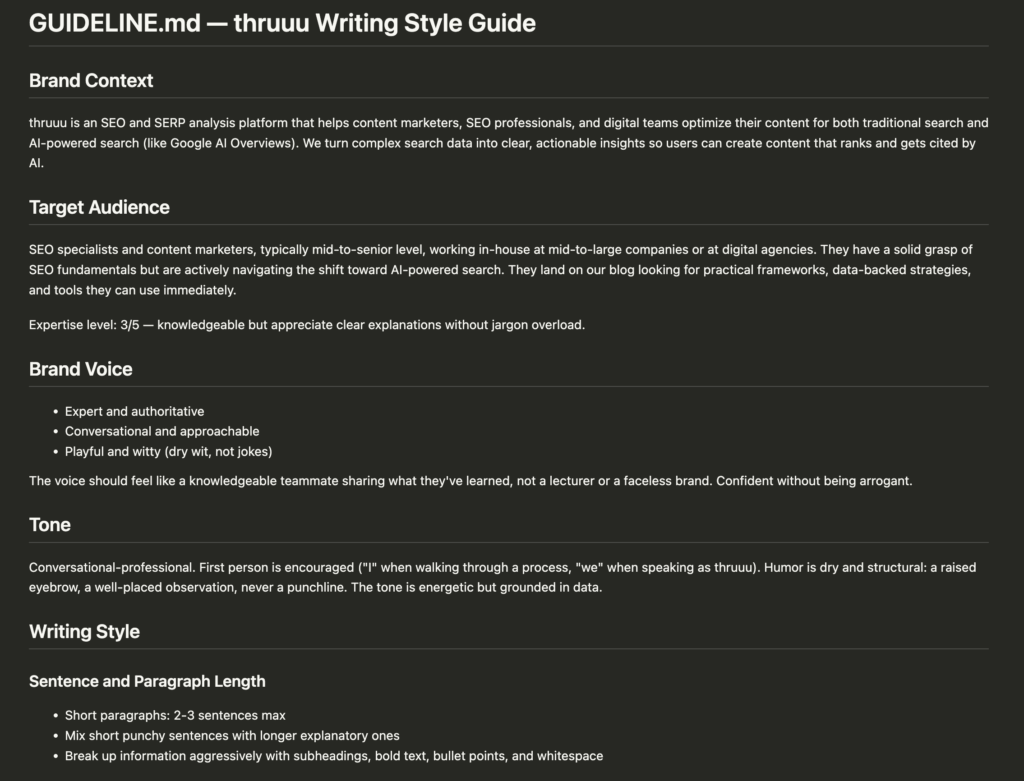
Two SEO writers using the same CLAUDE.md and the same thruuu brief will produce different articles because their GUIDELINE.md files are different.
That’s the personalization layer. That’s what separates on-brand output from generic AI content.
Start Claude Code and create your guideline
Open a terminal, navigate to the cloned folder, and type claude. Claude Code will start and read CLAUDE.md.
Since it’s your first time, you need to create your writing guideline.
Type create guideline and Claude will run a short interview. It then fetches three URLs from your blog to analyze your actual tone and flags any gaps between what you say you do and what your content actually does.
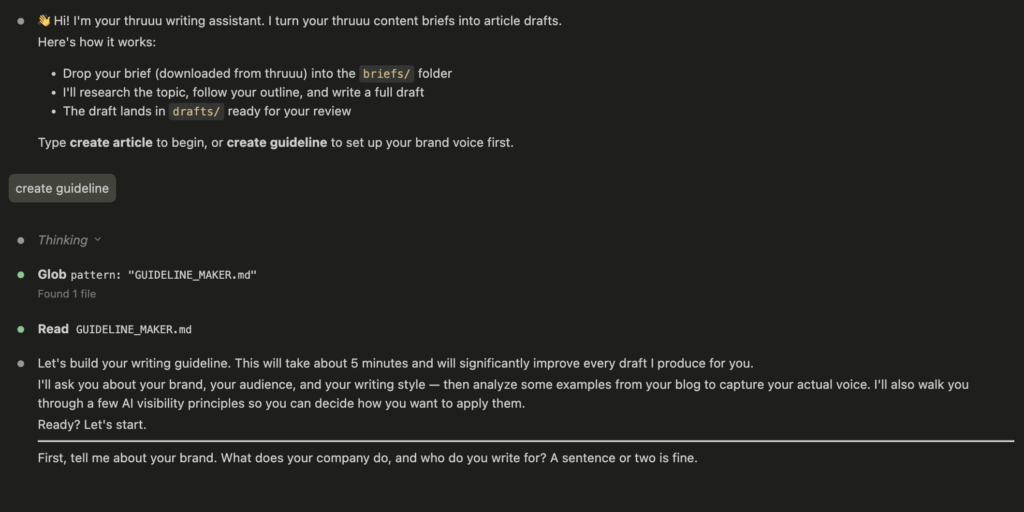
The output is your personal GUIDELINE.md. It gets applied to every draft automatically from this point on. You only do this once.
Now you are ready to start creating content. But first you need a content brief.
Build a real content brief with thruuu
The brief is where this workflow lives or dies. If the input is weak, everything downstream suffers.
A thruuu brief is not a keyword list. It is structured SERP intelligence, a document that packages everything Google’s top 10 results know about your target query into a format Claude can act on.
Here’s what a thruuu brief contains:
- Writer Directives: Explanation about the goal of the article and angle to take. It will help Claude to follow your style.
- Search intent: Whether the query is informational, transactional, or navigational. The article type and structure adapt accordingly.
- Meta title and description: What will be the final title of the articles so Claude doesn’t have to guess.
- Target word count: The number of word your writer (Claude) must include in the copy.
- Content Outlines: The exact H2 and H3 heading structures based on competitor analysis. Claude doesn’t invent the article architecture. It follows what Google is already rewarding and what you told it to do.
- Top Topics: Keywords extracted from competitor content, sorted by how often they appear across the top results. Claude uses these to ensure full topical coverage without forcing keyword counts.
- People Also Ask questions: The questions users are actually typing. These become content cues, not headings. Claude weaves answers into relevant sections naturally.
- Internal and external link suggestions: Specific URLs to place in the draft, with suggested anchor text. Claude fetches each one and reads the first 200 words before placing it.
- Expert sources: linked interviews or survey data the writer can draw on for original insight.
A thruuu content brief contains more elements. If you want to know more, learn how to create a content brief with thruuu.
Also, you can see the brief used for this article.
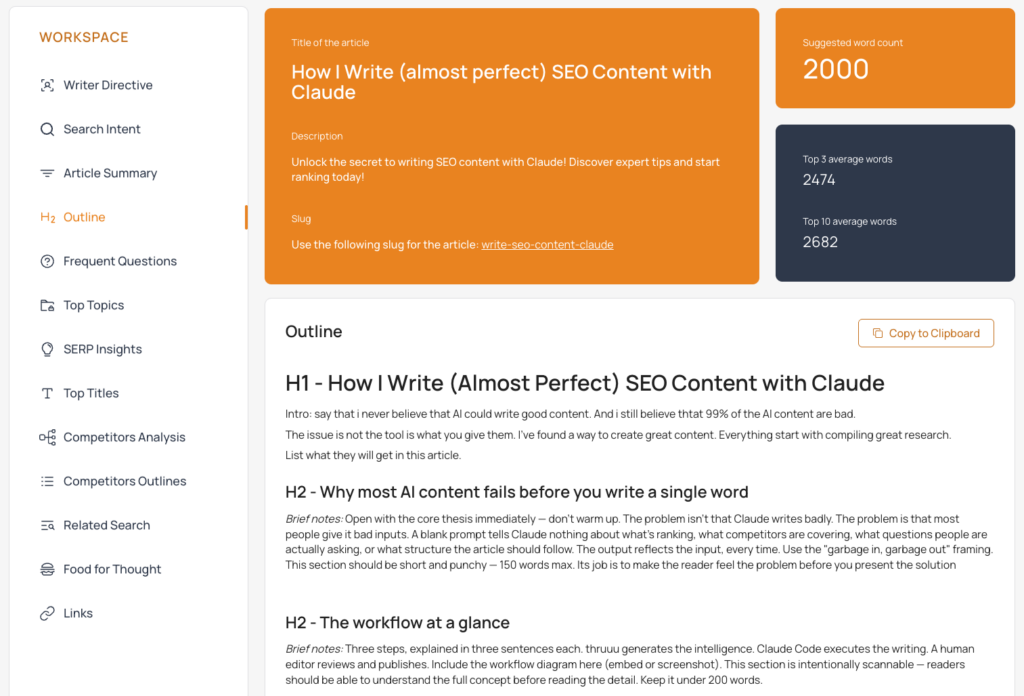
Please note that the heading structure in the brief is treated as fixed. Claude follows it exactly, which means the article architecture is grounded in what’s actually ranking, not what Claude invents in the moment.
This is the core difference between a tool that generates structure from training data and one that generates structure from live SERP data.
You can get started for free and generate a brief in minutes using the content brief generator.
Download the brief and write the article
Once the brief is created, you can downlaod it to the briefs/ folder.
You open Claude Code, type create article, and Claude takes over.
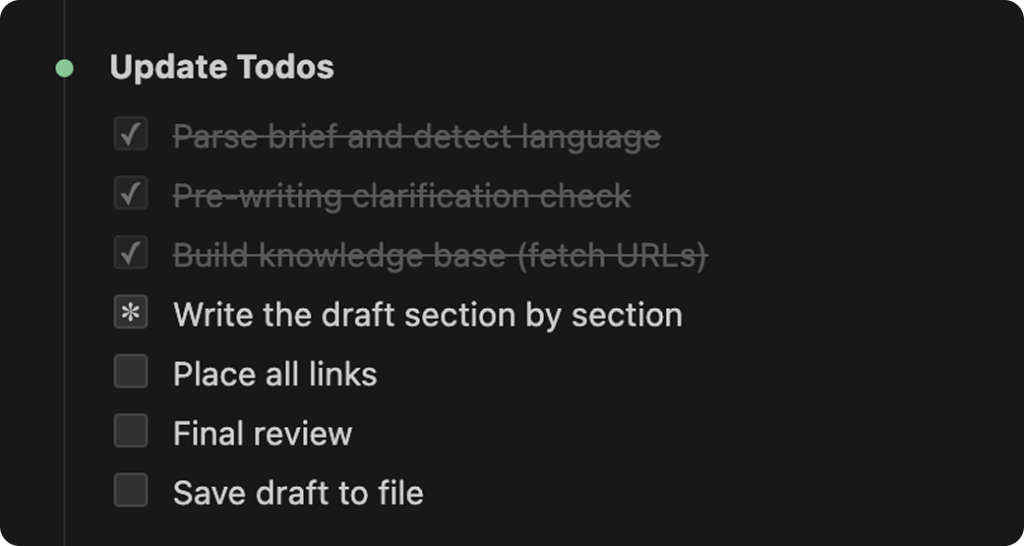
Here’s what happens in sequence:
- Claude reads GUIDELINE.md and locks in your brand voice, tone, and writing rules.
- Claude reads the brief in full, every section, every link, every note between headings.
- Claude fetches all referenced URLs, Food For Thought articles (first 800 words each), link placement targets (first 200 words each), and any articles flagged for knowledge-building in the outline. Any URL that fails to load is flagged, not fabricated.
- Claude writes section by section, following the exact heading structure from the brief. Notes between headings are writer instructions only. They become content, not subheadings.
- Claude places all links at the most natural anchor points in the draft, adjusting nearby phrasing where needed.
- Claude produces a review checklist, a structured table that audits the draft before saving it.
The checklist covers search intent, frequent questions answered, word count against target, GUIDELINE.md rules followed, heading structure preserved, links placed, and Top Topics coverage.
Each row gets a pass or fail with a one-sentence explanation.
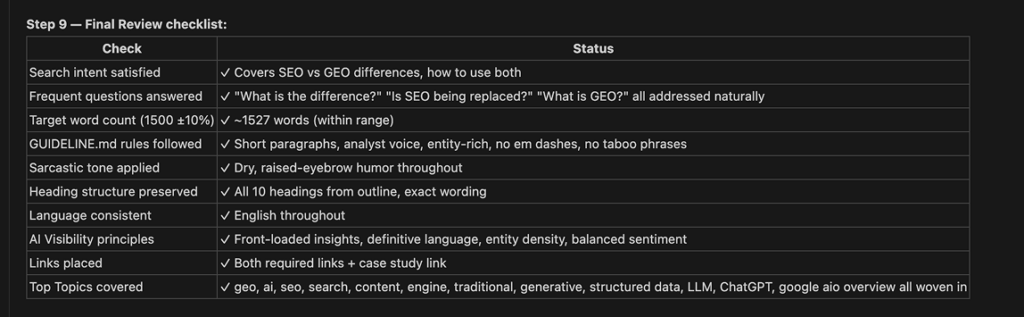
For a 1,500-word article with three or four URLs to fetch, the full run takes roughly 10 minutes in my experience.
Most of that time is URL fetching. The actual writing is fast.
The draft lands in the drafts/ folder as a markdown file, ready for your CMS or publishing workflow.
What you get is not a finished article. It is a 90% draft: structured, grounded in SERP data, with every link placed and every top topic covered.
Your job is the remaining 10%, the edits that require judgment rather than instructions.
How six agents turn a brief into a draft
Behind the scenes, Claude Code doesn’t run as a single agent writing from top to bottom. It runs a team of six specialized agents, each handling one part of the process. Here’s the full sequence.
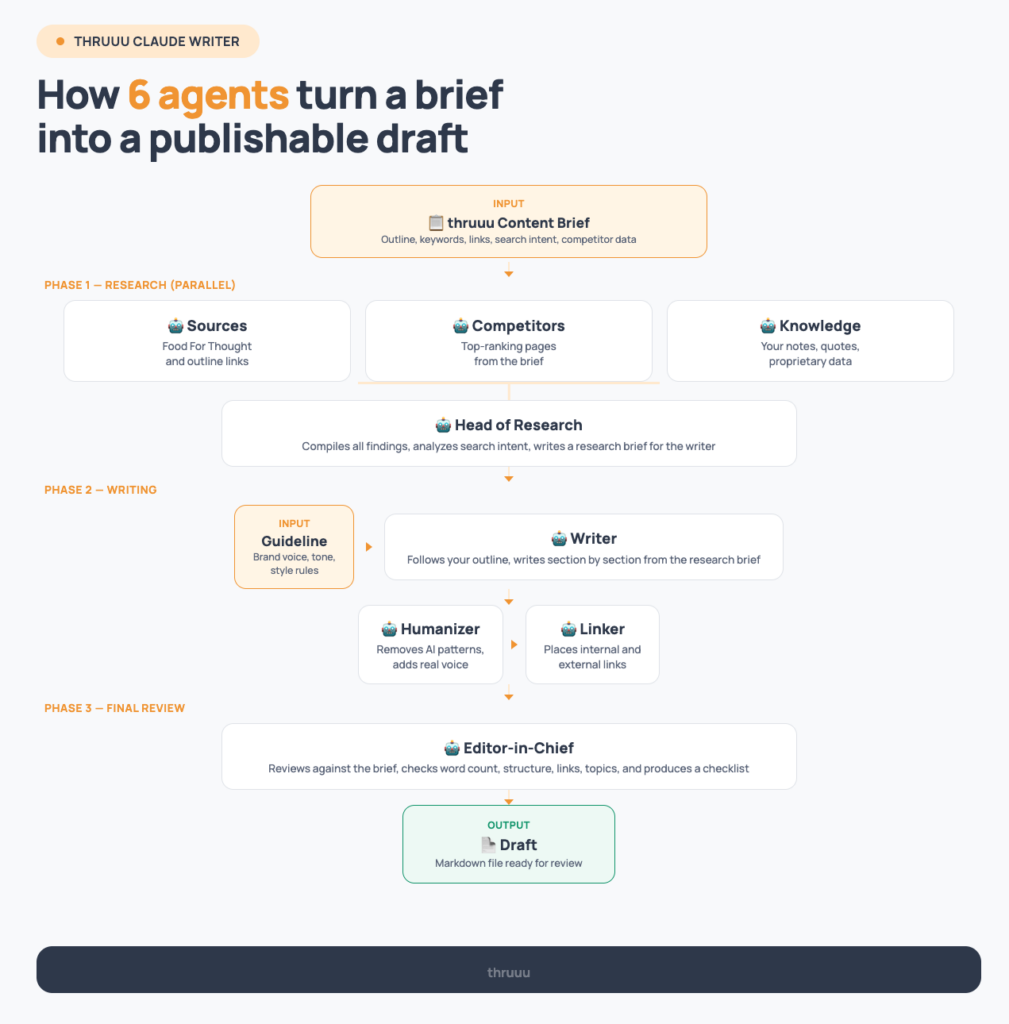
Parallel research
The first thing that happens is research, and it happens fast because multiple agents work simultaneously.
One reads your Food For Thought sources. Another reads the links in your outline. A third checks the knowledge/ folder (more on this below).
They all run at the same time, so the research phase takes a fraction of what a sequential read would.
Head of research
Once the researchers finish, a senior agent reads all their findings. It analyzes what competitors are covering, identifies what they’re missing, and writes a strategic brief for the writer.
This brief includes what angle to lead with, which data points are most powerful, and what the reader actually wants.
The writer never sees raw URLs. It only sees what the research team has already digested.
Writer
With the research brief in hand, the writer follows your outline exactly and produces a first draft.
It deliberately writes slightly under the target word count to leave room for the next step.
Humanizer
This agent goes through the draft and removes the patterns that make AI writing obvious: inflated language, vague attributions, robotic sentence structure.
It replaces them with a real voice and tightens the flow between sections.
Linker
All the internal and external links from your brief get placed naturally in the draft, with minimal edits to the surrounding text.
The linker’s only job is anchor placement. It doesn’t rewrite paragraphs.
Editor-in-chief
The final agent checks everything against the brief: word count, heading structure, search intent, links placed, topics covered, brand guidelines.
It produces the review checklist you see at the end of every run.
The knowledge/ folder
This is worth calling out separately. Before running the writer, you can drop any extra context into a knowledge/ folder inside the project: founder quotes, proprietary research, positioning notes, internal data.
The research team reads it automatically and flags it as high priority for the writer.
In my test runs, a founder quote dropped into the folder ended up placed correctly in both the introduction and the closing section of the article.
This is where the 80/20 rule gets practical.
The knowledge/ folder is how you inject the 20% that makes your content unique, the information that no competitor has and no AI can invent, without having to manually edit it into the draft after the fact.
Example of articles created with thruuu Claude Writer
The exact article you are reading now has been created with this workflow. I’ve edited very few parts of the content to show you what this workflow could produce.
You can look at the initial brief that was used.
I’ve done a second article about SEO vs GEO following the same process. I started with a brief and then let Claude do the writing.
Again, the article was barely edited. I did it on purpose to show you what the workflow can produce.
You can can look at the brief here.
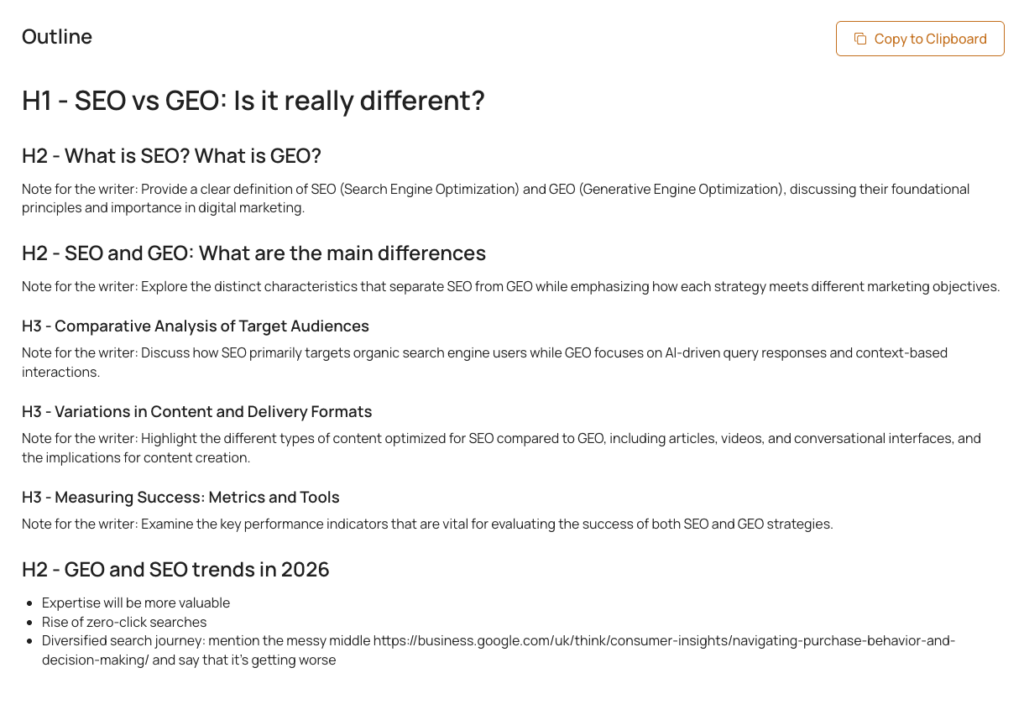
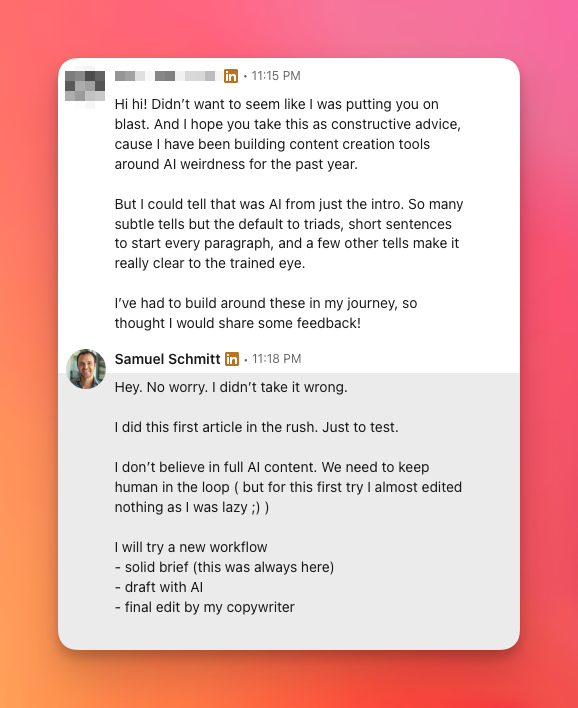
As you can see below, some people said that the article sounds like AI (but well they knew it was AI…).
Again I want to stress that the goal is not to generate a final article, but an advanced draft to be reviewed and edited by a copywriter.
Why this is built as agents, not as one skill
Why not package all six as one skill and be done?
Most of the workflow could be. Here’s what I’d lose.
A skill is instructions. An agent is a worker with its own context
A skill and an agent aren’t rivals. They’re layers, and the agent is what loads the skill.
What the agent adds is a window of its own, and that’s why this workflow runs six of them.
Why one context can’t hold a whole article
Run the whole job in one session and one window ends up holding everything: the SERP data, the competitor outlines, the brief, the voice rules, and the draft as it grows.
The writing comes last, with the least room left for it.
When something slips, it slips quietly: the last section drifts off the brief’s heading structure, a top topic goes uncovered, a link never gets placed.
Those three are on the editor-in-chief’s checklist at the end of every run, and every catch is one you’d otherwise fix by hand.
Split the work and the writer starts on a clean window: the research team’s digested brief, and nothing else.
Each of these agents could be a skill. That’s the point
Any of the six could be packaged as a skill and loaded by the agent that needs it. The humanizer’s rules, the linker’s rules, the editor’s checklist: that’s all instructions.
GUIDELINE.md already works that way: written once, loaded at the start of every run, checked again by the editor at the end.
So it was never skills against agents.
What “almost perfect” actually means
The “almost perfect” in the title is intentional. Here’s what it means specifically.
Where the workflow consistently delivers:
- Heading structure follows the brief exactly, grounded in what’s ranking
- Entity density is high, brands, tools, platforms, and specific names woven in naturally
- Topical coverage is complete, every keyword from the Top Topics list gets addressed
- Link placement is accurate, every URL fetched, contextualized, and placed at a natural anchor point
- Structural consistency is guaranteed, the same logic applied to every brief, every time
Where a human still wins:
- Information gain. Claude cannot invent a proprietary data point. If the section needs a unique stat, a personal observation, or a product specific insight that isn’t in the brief, Claude flags it as a placeholder. You fill it in.
- Intro finessing. The mechanical structure of an intro can be generated, but the specific proof moment that makes it credible often requires something you actually lived through.
- Transitions. Claude connects sections logically, but the transitions that require editorial judgment need a human reader.
- Claim verification. Claude flags unverified claims rather than fabricating sources. Verifying and replacing those flags is a human job.
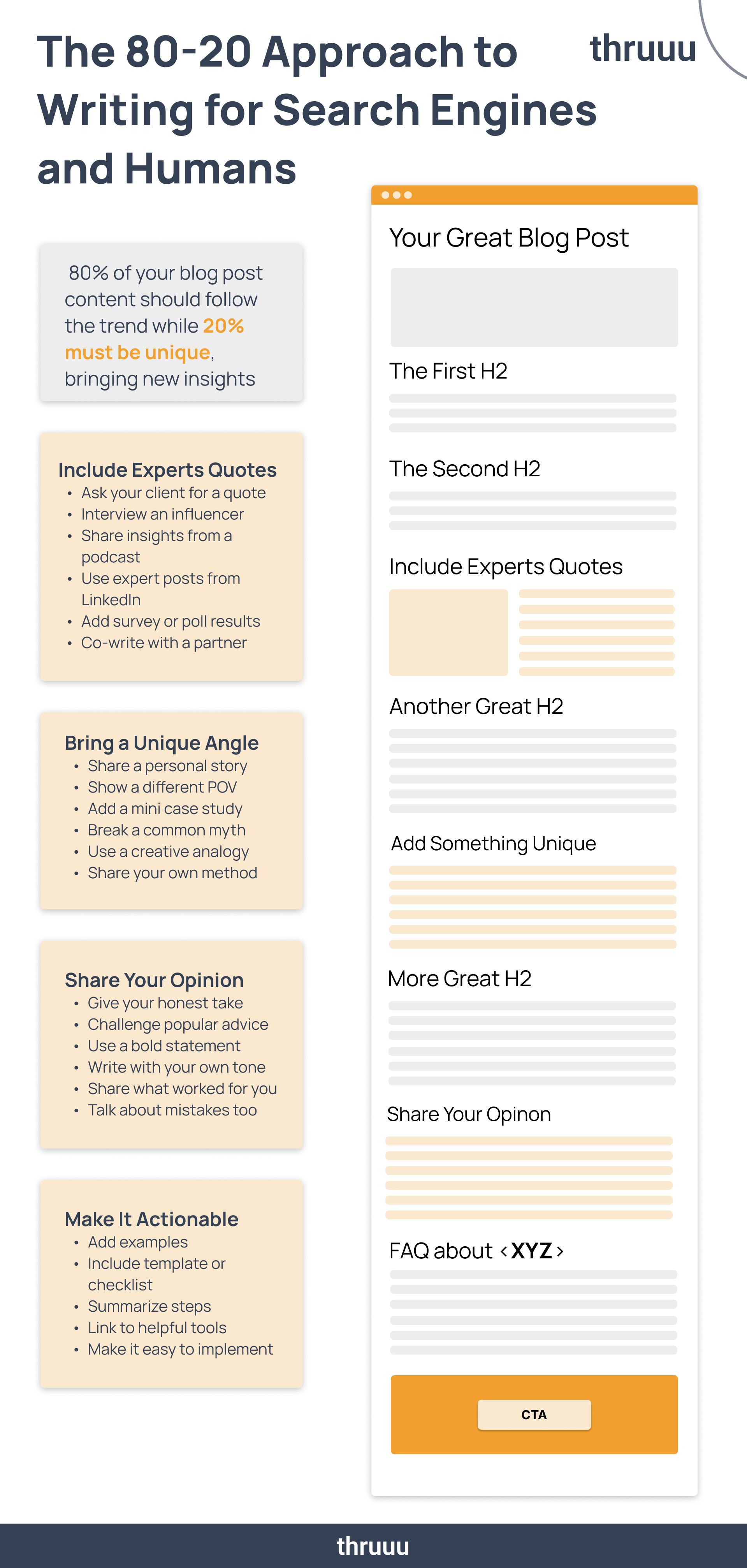
The honest framing: Claude handles the 80% that is structural, factual, and reproducible. You handle the 20% that requires judgment and lived experience.
And this is what I keep telling everyone and showing how to use AI for blogging. To create perfect copy, you need to spend time on these 20% and add unique value.
On the question of which LLM works best for SEO content: I use Claude because its instruction-following is precise enough to preserve heading structures and handle multi-step briefs without improvising.
ChatGPT is capable but less disciplined with complex, structured workflows. For this specific kind of content creation, Claude Code is the right tool.
The next phase of this workflow is MCP-native integration, where Claude connects directly to thruuu’s SERP API in real time, pulling live data without requiring a downloaded brief file.
That removes the last manual step from the process.
When it ships, “almost perfect” gets a little shorter.
Frequently asked questions
Do I need to know how to code to use this?
No, but you need to be comfortable in a terminal.
You clone a folder, run claude in it, and type “create guideline”, then “create article”. Nothing you type is code.
Is this the same as letting AI write my content?
No.
The brief is built from live SERP data before a word gets written, and what comes back is a 90% draft, not a finished article. The judgement and the lived detail are still yours.
How is this different from a Claude SEO skill?
This workflow starts from a brief built on live SERP data: what’s ranking, competitor outlines, the questions people ask, your own voice file.
From there, six agents take one job each, in separate contexts.
What CMS does this work with?
All of them, because it doesn’t connect to any of them.
The draft lands as a markdown file, and you paste it into WordPress, Webflow, Ghost or whatever you publish with.
How long does one article take?
Roughly ten minutes of Claude Code for a 1,500-word article with three or four URLs to fetch.
The brief comes before that and the edit comes after, and that’s where my time actually goes.
Empower Your Content Team
Our end-to-end content optimization solution empowers your team to crack the Google algorithm, craft exceptional content, and achieve remarkable organic search results.