

Want to track how AI search engines answer your target keywords, programmatically?
The thruuu LLM API lets you query ChatGPT, Gemini, Perplexity, and Google AI Mode in a single request, alongside your usual Google SERP scrape.
One API call returns the AI answer, the cited sources, brand mention signals, and a ready-to-render markdown version of the answer.
With the thruuu LLM API you can:
- Scrape AI answers from ChatGPT, Gemini, Perplexity, and Google AI Mode
- Get cited sources for each AI answer
- Detect brand mentions and per-brand citation counts
- Compare brand presence in AI answers vs. organic results for the same keyword
- Extract themes and topics covered by each AI engine
- Render the answer instantly as plain markdown
- Combine LLM data with SERP data in a single API request
This is built for agencies, SEO consultants, and developers running programmatic GEO (Generative Engine Optimization) workflows who need AI visibility data sitting next to traditional organic data.
Overview
The thruuu LLM API is not a separate endpoint. It is an extension of the existing SERP API.
Add the include_llm parameter to a single-keyword scrape request, and the response payload gains an llm_results array containing one entry per requested engine.
Supported engines:
- ChatGPT
- Gemini
- Perplexity
- Google AI Mode
Data is delivered through the same webhook callback as your SERP results, or via the GET endpoint if you prefer polling. No separate workflow, no second integration.
Important: include_llm is supported on single-keyword requests only. Bulk keyword jobs cannot use this parameter.
The include_llm parameter
Add include_llm to your scrape request to specify which AI engines to query.
It is an optional array. Omit it entirely and the request behaves exactly like a standard SERP API call.
Valid values
| Value | Engine |
|---|---|
"chatgpt" | ChatGPT |
"gemini" | Gemini |
"perplexity" | Perplexity |
"google_ai_mode" | Google AI Mode |
You can request one engine, several, or all four. Order in the array is preserved in the response.
Plan access
| Plan | Engines available |
|---|---|
| Agency | All four |
| Pro | ChatGPT only |
| Starter, Pay-as-you-go, Free | None |
Credit cost
1 credit per engine requested, added to your usual SERP credit when the job is accepted.
If an engine fails during processing, that credit is automatically refunded. Partial refunds apply: request two engines, one fails, one credit comes back. You only pay for what works.
Making your first LLM API call
Send a POST request to the standard SERP endpoint, with include_llm added to the request body.
Endpoint
POST https://api.thruuu.com/api/v2/serpsRequest headers
{
    "Content-Type": "application/json",
    "Authorization": "Bearer YOUR_API_TOKEN"
}
Request body
{
    "keywords": ["best project management software"],
    "parameters": {
        "search_engine": "google.com",
        "country": "us",
        "language": "en",
        "device": "desktop",
        "num": 20
    },
    "include_llm": ["chatgpt", "gemini", "perplexity", "google_ai_mode"],
    "reference": "my-job-ref"
}
Note that keywords must contain exactly one entry when include_llm is set. If you pass multiple keywords with include_llm, the API returns:
"include_llm is only supported for single-keyword requests"The llm_results field in the callback
Your webhook callback gains a top-level llm_results array when include_llm was present in the request.
The callback fires only after every requested engine has finished, so you receive a complete dataset in one delivery. No polling required.
Structure
Each entry in llm_results has seven fields:
| Field | What it contains |
|---|---|
type | The engine key ("chatgpt", "gemini", "perplexity", "google_ai_mode") |
status | "completed" if the engine returned an answer, "failed" if it did not |
content | The AI-generated answer as a structured block array. null if the engine failed |
sources | The sources cited in the answer. null if the engine failed |
insights | Brand mentions, cited domains, themes, and keyword signals. null if the engine failed |
brand_analysis | Per-brand mention counts and whether each brand appears in organic results. null if no brands detected or the engine failed |
content_markdown | The AI answer as a plain markdown string, ready to render. null if the engine failed |
Every entry is always present and always has all seven keys, including engines that failed. You can iterate llm_results without special-casing: a failed engine looks structurally identical, just with null data fields and "failed" status.
If include_llm was not in the original request, the llm_results key is absent from the callback entirely. Existing integrations are unaffected.
Worked example
Request body
{
    "keywords": ["best project management software"],
    "parameters": {
        "country": "us",
        "language": "en"
    },
    "include_llm": ["chatgpt", "gemini"]
}
Callback payload
{
    "eventType": "bulk-scrape",
    "id": "663a1f...",
    "reference": "my-job-ref",
    "serps": [
        {
            "id": "...",
            "query": "best project management software",
            "organic": [ "..." ]
        }
    ],
    "llm_results": [
        {
            "type": "chatgpt",
            "status": "completed",
            "content": [
                { "type": "paragraph", "text": "Project management software helps teams plan, track, and collaborate..." }
            ],
            "sources": [
                "https://example.com/article-1",
                "https://example.com/article-2"
            ],
            "insights": {
                "brands": ["Asana", "Monday.com", "Notion"],
                "themes": ["task tracking", "team collaboration", "project planning"]
            },
            "brand_analysis": {
                "brandMentions": [
                    { "brand": "Asana", "mentions": [ "..." ] }
                ]
            },
            "content_markdown": "Project management software helps teams plan, track, and collaborate...\n"
        },
        {
            "type": "gemini",
            "status": "failed",
            "content": null,
            "sources": null,
            "insights": null,
            "brand_analysis": null,
            "content_markdown": null
        }
    ]
}
In this example, ChatGPT returned an answer and Gemini failed. One credit is refunded for the Gemini failure.
The callback still fires with both entries present, so your pipeline receives a consistent shape regardless of which engines succeeded.
What the new fields unlock
insights
Gives you the signals thruuu already computes internally when processing an AI answer: brands cited, domains cited, themes covered, keyword-level analysis.
Feed it directly into a visibility dashboard without a separate enrichment step.
brand_analysis
Tells you, per brand, how many times it was mentioned in the AI answer and whether it also appears in the organic results for the same keyword.
This is the building block for brand-tracking workflows that compare AI presence against organic presence. The exact use case the GEO conversation has been waiting for.
content_markdown
The AI answer as plain text in markdown format, ready to drop into a report, CMS, or rendering pipeline. No structured-block conversion needed on your side. The API does it for you.
All three fields are included automatically whenever you use include_llm. No extra parameter to enable, no change required to existing integrations.
Query Builder support
If you use the Query Builder in the API dashboard to construct and preview requests before writing code, there is now a dedicated AI Search Engines section.
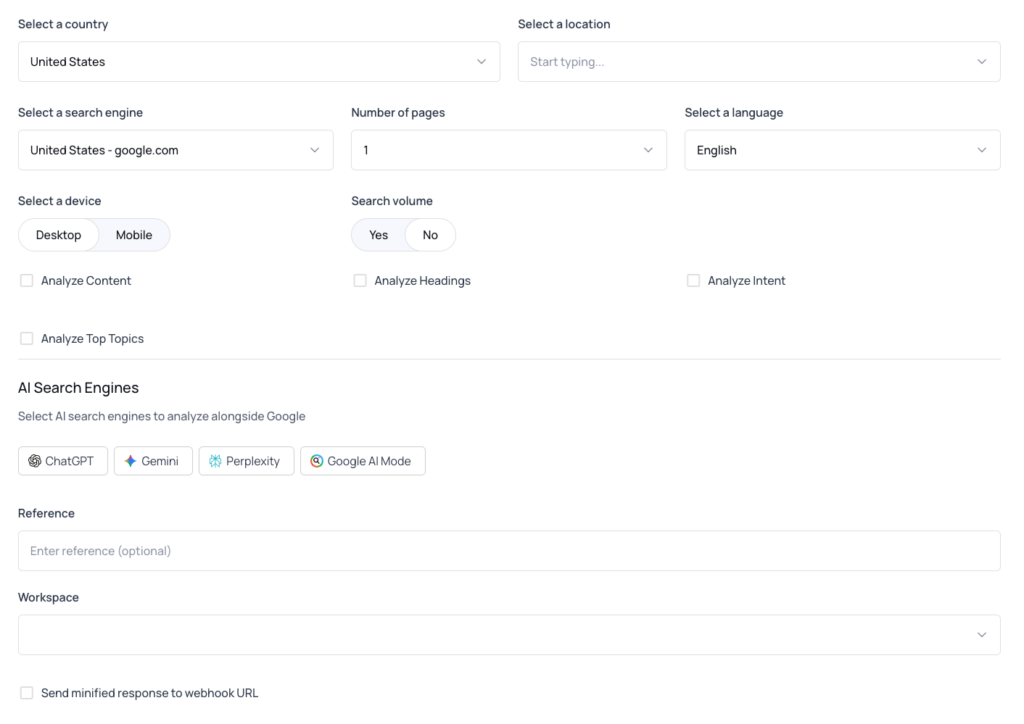
It shows one checkbox per supported engine. Check the engines you want and the builder adds include_llm to the request JSON automatically.
When you have more than one keyword in the builder, an inline note reminds you that LLM Analysis is only available for single-keyword requests.
The checkboxes stay visible so you can still see the correct request shape, but the API will reject the request if you submit it with multiple keywords.
Why this matters for SEO and GEO
AI search engines now intercept a growing share of informational queries before users reach Google’s top 10.
Tracking your visibility in those AI answers is no longer optional for any brand competing on organic acquisition.
The thruuu LLM API closes the gap between AI visibility tracking and traditional SERP analysis by delivering both in a single response. Common use cases:
- Brand visibility dashboards: track per-engine brand mentions over time across thousands of keywords
- Competitive AI monitoring: see which competitors are cited by which engines for your target queries
- Content gap analysis: identify keywords where you rank organically but are absent from AI answers, and the inverse
- GEO performance tracking: measure whether content optimization changes move the needle on AI citations
- Source-level audits: see exactly which pages are cited by ChatGPT, Gemini, Perplexity, and Google AI Mode for a given keyword
How to get started
- Create a free thruuu account at app.thruuu.com
- Upgrade to a Pro plan (ChatGPT only) or Agency plan (all four engines)
- Get your API key from the API dashboard
- Open the Query Builder, check the LLM engines you want, and copy the request shape
- Send a single-keyword POST request with
include_llmand parse thellm_resultsarray in your callback
What plan do you need?
| Plan | LLM API access |
|---|---|
| Free | Not available |
| Starter | Not available |
| Pay-as-you-go | Not available |
| Pro | ChatGPT only |
| Agency | ChatGPT, Gemini, Perplexity, Google AI Mode |
Each engine queried costs 1 credit on top of the SERP credit. Failed engines are refunded automatically.
Tips
- Start with one engine when prototyping. Validate your parsing logic against ChatGPT before fanning out to all four.
- Iterate
llm_resultsdefensively. Every entry has all seven keys including on failure, so checkstatus === "completed"before accessing data fields. - Use the Query Builder first. The exact request shape, including the
include_llmarray placement, is easier to copy than to assemble from documentation. - Persist
content_markdownraw. It is the cleanest format for diffing AI answers across runs and for feeding into downstream rendering. - Cross-reference
brand_analysiswith your organic data. The most actionable insight is identifying brands cited in the AI answer that are absent from the organic top 10, and vice versa.
Frequently asked questions
Can I request just one engine instead of all four?
Yes. Pass only the engine keys you need. Credits are charged only for what you request.
What happens if one engine fails?
Its entry in llm_results has status: "failed" and null for all data fields. The credit for that engine is refunded automatically. The callback fires normally, you are not blocked waiting for a retry.
Does this change my existing callback shape if I do not use include_llm?
No. If you omit include_llm, the llm_results key is absent from the callback entirely. No changes to your existing integration are required.
Can I use include_llm on a Pro plan?
Pro plans have access to ChatGPT only.
Is the data available if I poll instead of using webhooks?
Yes. Fetch the result with GET /api/v2/serps/:id and the same llm_results array (all seven fields) is included in the response.
Are AI insights and brand-mention data included automatically?
Yes. Every completed engine entry includes insights, brand_analysis, and content_markdown. No extra parameter to enable. They are null only when an engine fails.
Can I use include_llm on a bulk keyword job?
No. include_llm is supported on single-keyword requests only.
Track AI search visibility, programmatically
The thruuu LLM API gives you AI answer data, cited sources, and brand mention signals from ChatGPT, Gemini, Perplexity, and Google AI Mode in a single API call. No separate integration, no second pipeline.