

The thruuu Question Explorer is a People Also Ask tool for Claude. Give it one keyword, and you get every question people ask about the topic, grouped into the articles worth writing.
thruuu extracts the SERP data and scrapes the on-page data. Claude does the research. You decide what to write.
The Question Explorer is a skill, a set of instructions you add to Claude once. It is built on the MCP server of thruuu, an SEO content optimization platform.
People Also Ask research from Claude
People Also Ask is the box of related questions Google shows in its results, and opening one question adds more below it.
The Question Explorer opens them for you: it searches your keyword, then each question Google suggests, then each question under those, three levels deep.
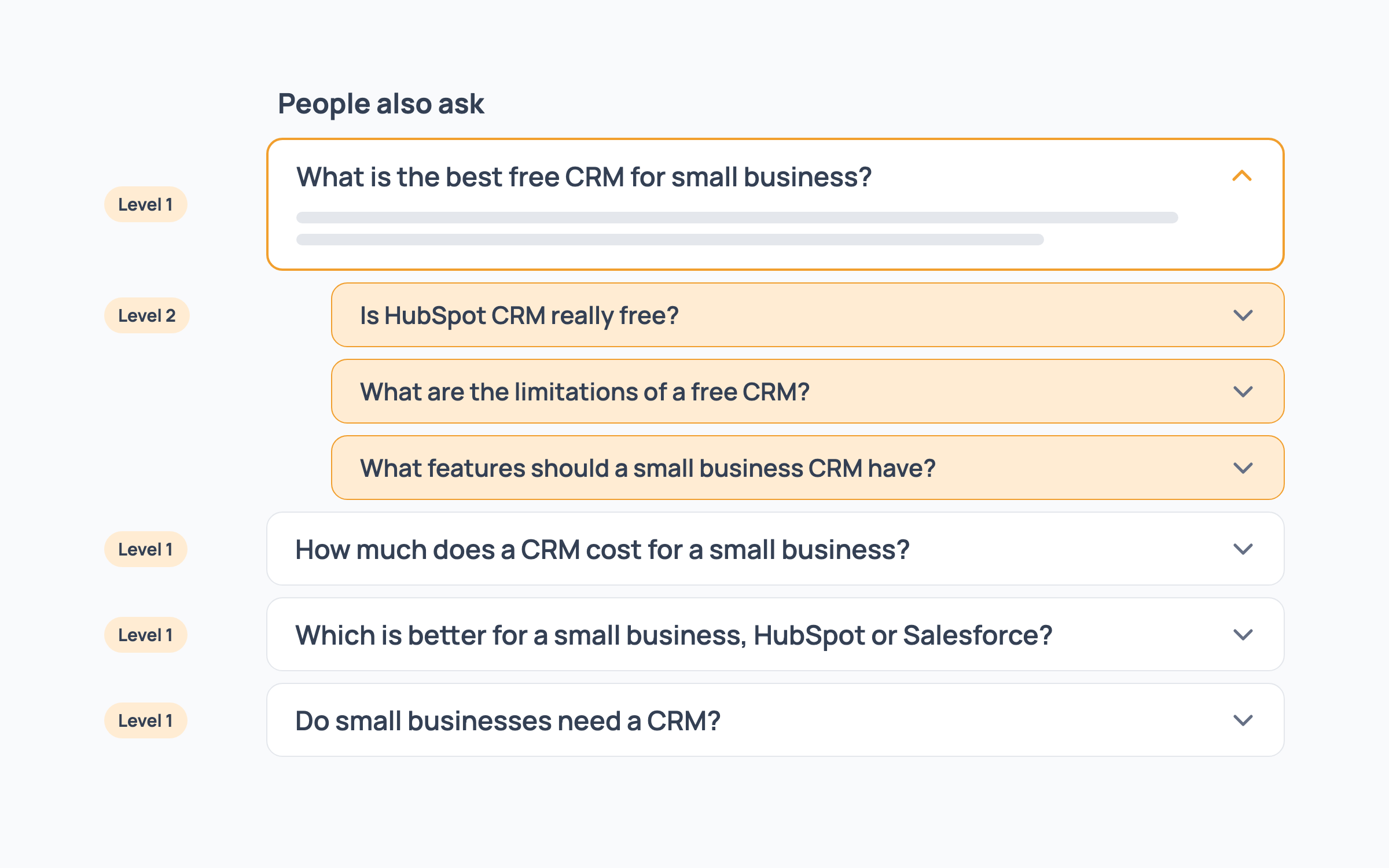
Every search runs on live Google results through the thruuu MCP server, so the questions come from Google today rather than from what an assistant remembers.
You get:
- Every question found, from People Also Ask and from the headings of the pages that rank
- The questions in the pages Google’s AI Overview cites
- Article groups, which gather the questions Google answers with the same pages so one article can cover them, the same principle as thruuu topic clusters
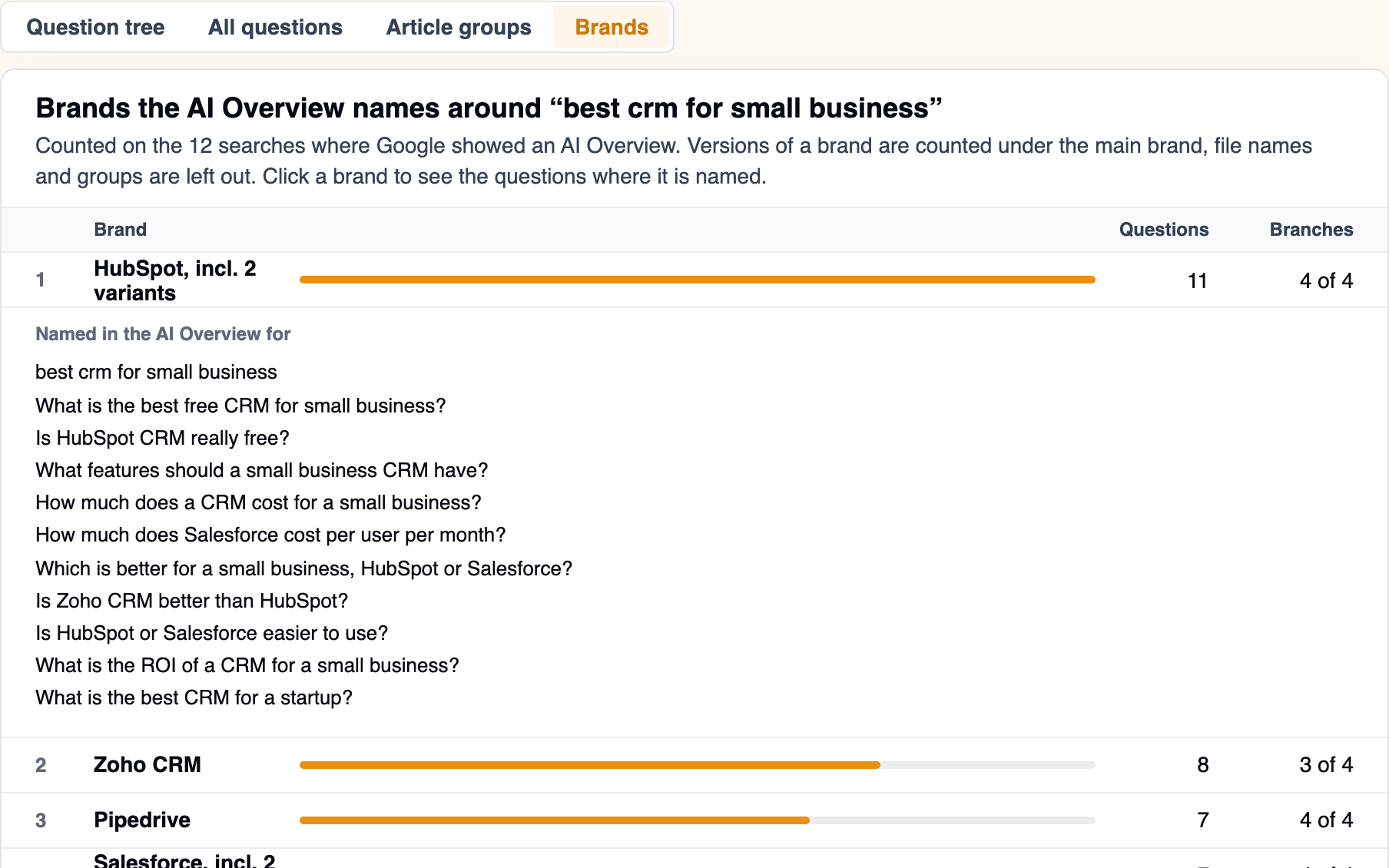
- The brands Google’s AI Overview names around your topic
You talk to it in plain words:
| Goal | Prompt |
|---|---|
| Standard run | build a question explorer for "best crm for small business" |
| Another market | build a question explorer for "logiciel crm" in France, French |
| Lists in chat instead of the interactive page | build a question explorer for "crm pricing", no page |
| Shorter run, 2 levels | build a question explorer for "crm for startups", 2 levels only |
| A plain question | what do people ask about "crm implementation"? |
| Brand angle | which brands does Google's AI Overview name around "best crm"? |
Explore the questions on an interactive page
When the searches finish, Claude builds one interactive page with four tabs, or gives you the same lists in chat.
If you came looking for an AlsoAsked alternative, start with the Question tree: it maps the questions the way AlsoAsked does.
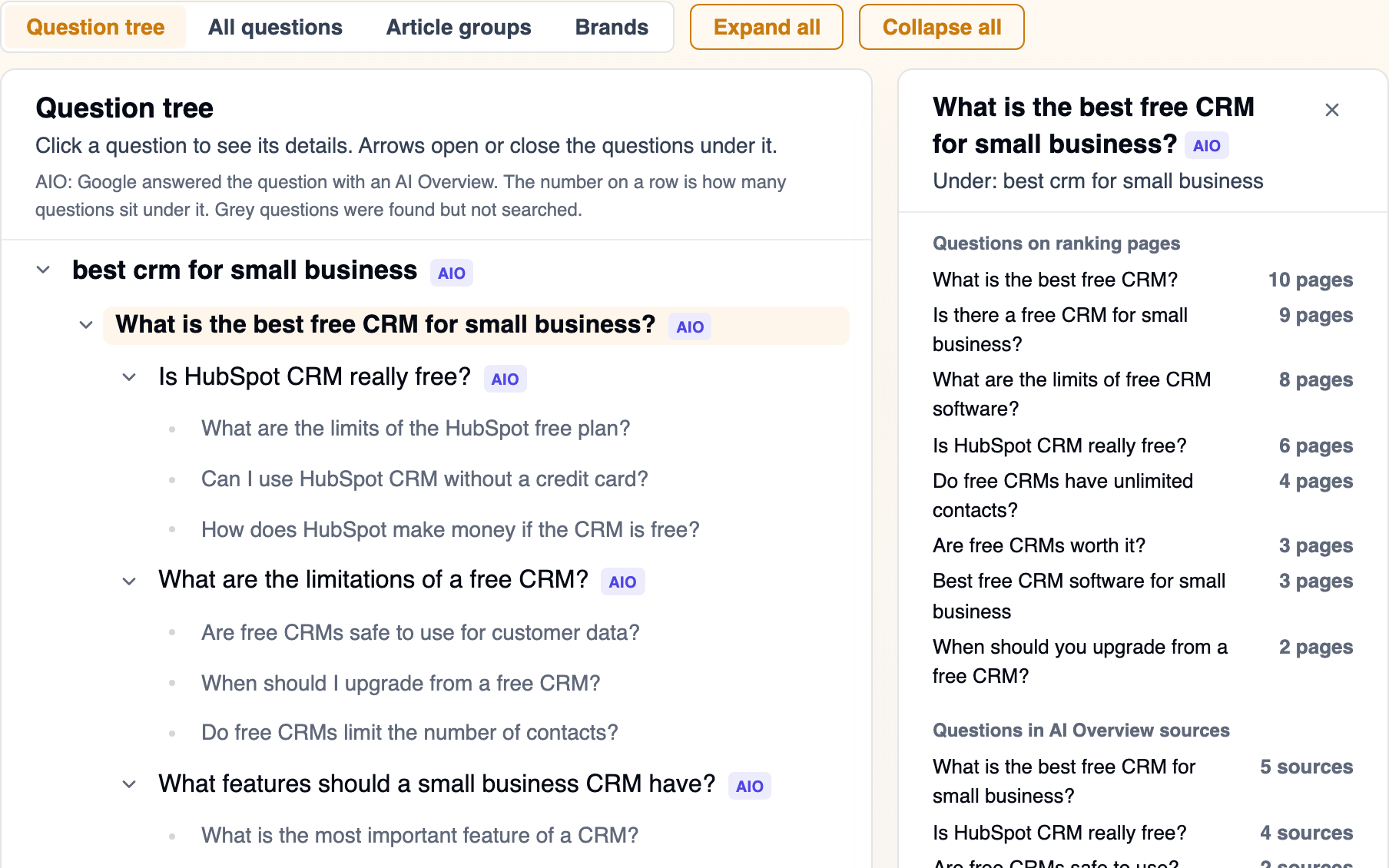
The screenshots below come from a run on “best crm for small business”.
The Question tree shows how the questions branch out from your keyword. Click any question to see the questions the ranking pages answer about it.
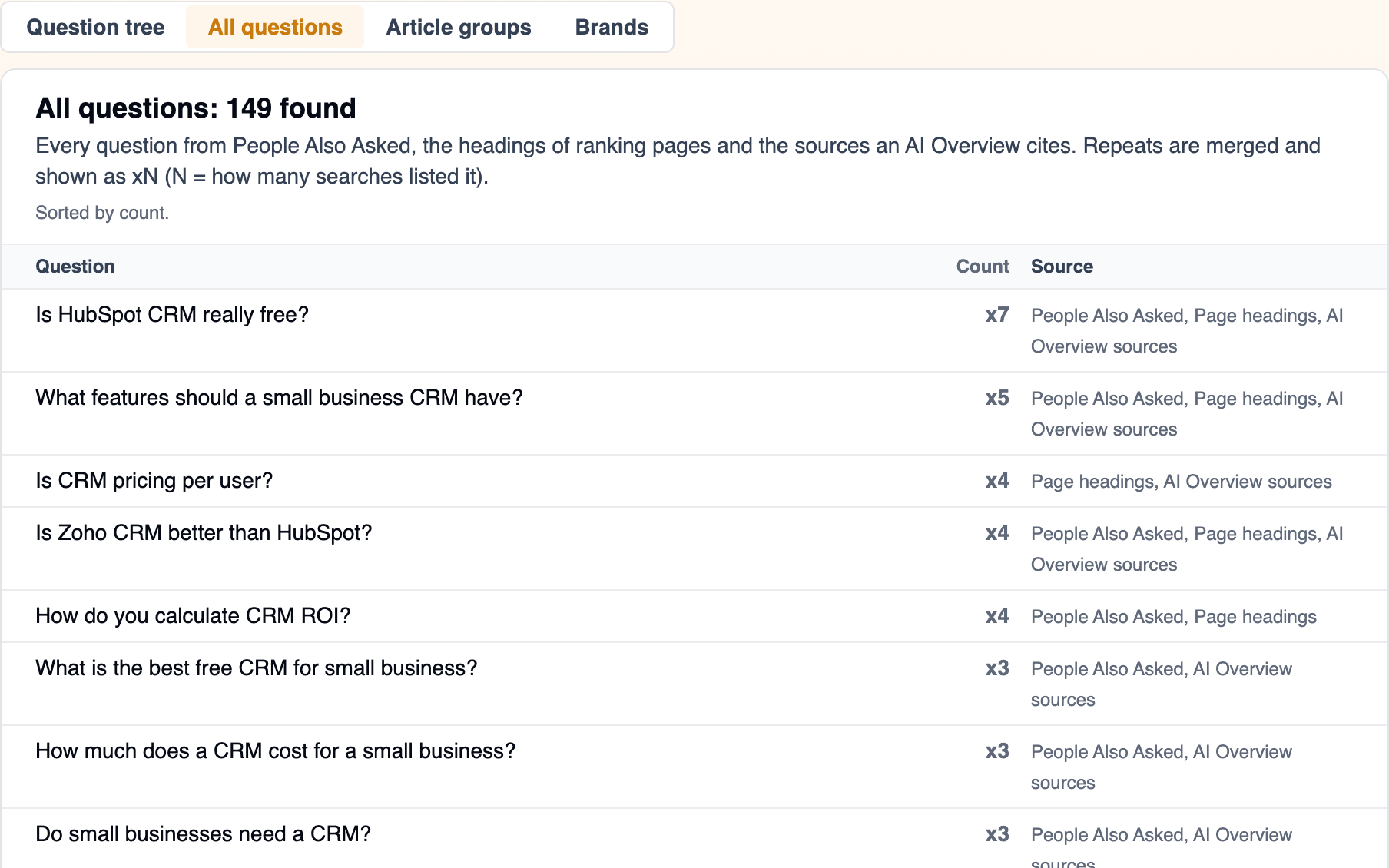
All questions gives you one list of every question found, sorted by how many searches listed it.
You can turn that list into a thruuu topic cluster. Cluster all of them, at the bottom of the tab, copies this prompt with every question listed under it:
Create a topic cluster from these <n> questions about "best crm for small business":
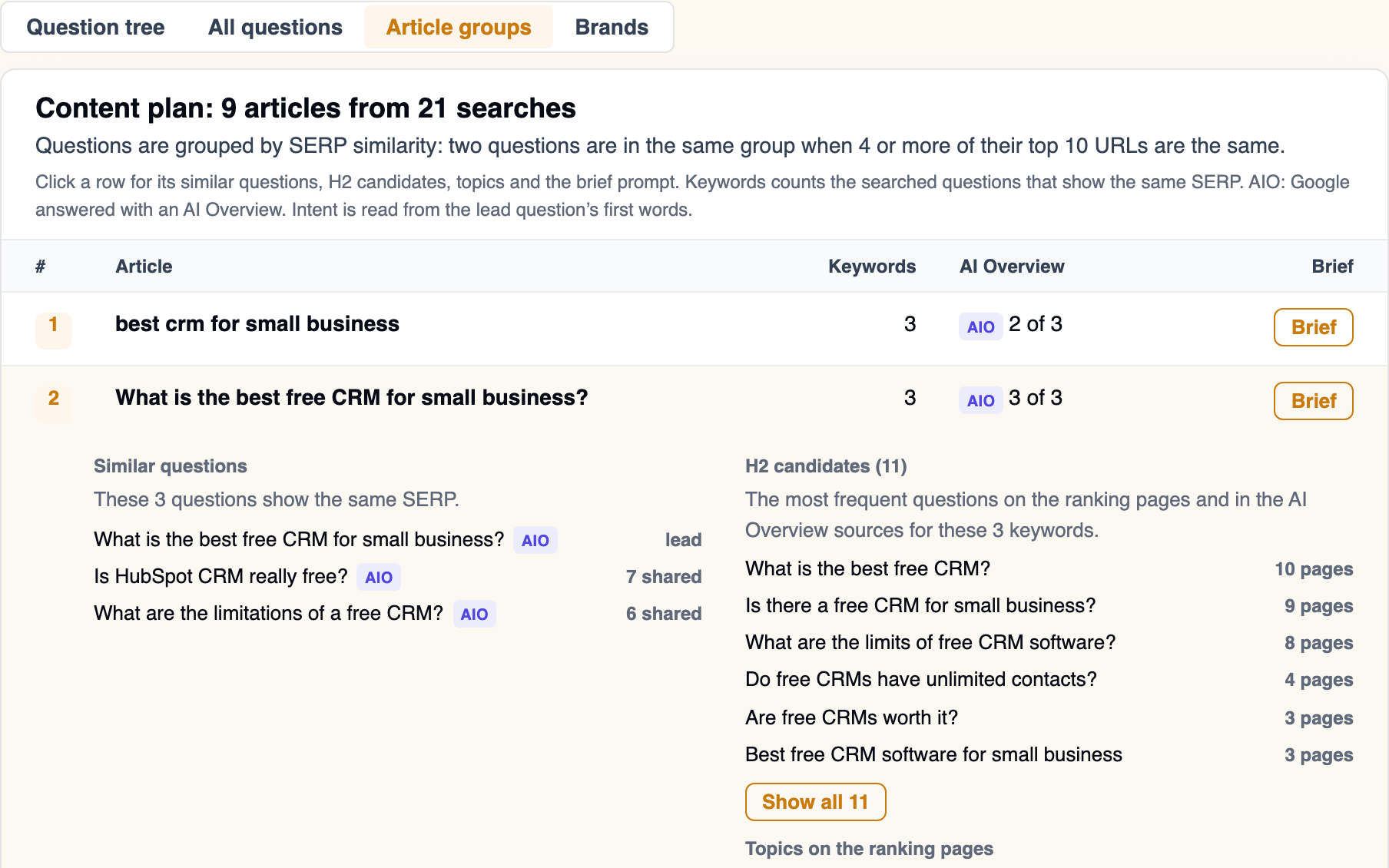
The Article groups tab is your content plan. It shows which questions one article can answer, with H2 candidates taken from the pages that rank.
Pick a question in a group and click Copy prompt to start a brief from it. The search is already in your account, so Claude only asks which brief template to use:
Create a brief from the SERP analysis <id> for "Is HubSpot CRM really free?".
To check what Google rewards before you write, ask Run search intent on the lead question of each article group.
Brands shows which brands Google’s AI Overview names around your topic, and on which questions.
To see whether your own domain is cited for the same questions, the tab ends with a prompt for AI Overview monitoring. Claude asks for your domain and brand name:
Create an AI Overview report that tracks the questions found for "best crm for small business" in this explorer, for my domain.
Two more requests work from any tab. Rebuild the question explorer page for "best crm for small business" from the saved data. brings the page back without new searches, and Export the question explorer to CSV. gives you the lists as a file.
How it works
Setup takes about two minutes, in Claude Code, claude.ai or the Claude desktop app. You need a thruuu account.
Connect the thruuu MCP server to Claude
In thruuu, open API & Bulk Tools > MCP. The page shows your MCP key and the setup for each assistant. Connect thruuu once:
- In Claude Code, run the command from the MCP page and start a new session.
- In claude.ai or the Claude desktop app, open Settings > Connectors > Add custom connector, name it
thruuuand paste the connection URL.
To check, ask Claude “What is my thruuu credit balance?”
Add the Question Explorer skill
On claude.ai and the desktop app, first turn on code execution in Settings > Capabilities > Run code in the cloud, which the skill needs to build its page.
Then download the zip and upload it, still zipped, in Settings > Capabilities > Skills > Upload skill.
In Claude Code, run this command, then restart:
mkdir -p ~/.claude/skills && curl -L https://github.com/thruuu/thruuu-skills/archive/main.tar.gz | tar -xz -C ~/.claude/skills --strip-components=2 thruuu-skills-main/skills/thruuu-question-explorerThe skill’s source, and every thruuu skill, is in the thruuu-skills repository on GitHub.
Run your first question explorer
Type build a question explorer for "best crm for small business", pick the market and confirm the run. A full run usually takes 5 to 7 minutes.
If something goes wrong:
| What you see | Fix |
|---|---|
| The upload refuses the file | Upload the zip itself, not an unzipped folder |
| Claude does not use the skill | Check the skill is switched on in Settings > Capabilities > Skills, start a new chat and mention “question explorer” |
| No thruuu tools in Claude | The connector is missing or off: connect the thruuu MCP server again |
| The lists come back in chat but no page | Code execution is off: turn it on as in the skill step |
| The run stops after the first search | Google showed no People Also Ask for that keyword. Try a question-style keyword, such as “how to choose a crm” |
Tips for the Question Explorer
- Read the Modifiers people add in a question’s panel. Words such as free, reddit or for startups tell you which version of the question searchers want answered.
- Treat the H2 candidates as the first draft of your outline, then cut the ones your angle does not need.
- Download the page and send it to a client. It is one HTML file that opens in any browser, which makes it a quick way to open a pitch or an onboarding call.
What plan do you need?
The Question Explorer skill is free and works on every plan, including Free.
The searches spend credits: 1 credit per Google search, about 21 for a full run of three levels, and often less because repeated questions are skipped. A 2-level run costs about 5 credits.
| Plan | Market | AI Overview questions | Brands | Topic cluster | AI Overview report |
|---|---|---|---|---|---|
| Free | United States, English | No | No | No | No |
| Pay as you go, Starter | Any | No | No | Yes | No |
| Professional | Any | Yes | No | Yes | Yes |
| Agency | Any | Yes | Yes | Yes | Yes |
| Trial | Any | Yes | Yes | Yes | Yes |
Frequently asked questions
Where are the results saved?
Every search is saved as a SERP analysis in your thruuu account. The page and its data file are saved on your computer in Claude Code, or in the chat on claude.ai, and the page can be rebuilt from them without searching again.
How many questions will I get?
It depends on what Google shows for your keyword. The run on “best crm for small business” found 149 questions in all, sorted into 9 article groups.
How do I choose which People Also Ask questions to target?
Start from the Article groups tab rather than from single questions. Each group is one article, so target its lead question and answer the similar questions in the same page. To decide between groups, the All questions tab shows which questions the most searches listed.
Ready to research People Also Ask questions from Claude?
With the thruuu Question Explorer, one prompt maps the questions people ask about a keyword, groups them into articles, and hands the one you pick to a thruuu brief.