

Every month, your content team needs one answer: which pages should we write, and which should we improve?
An AI SEO content workflow helps you automate that process. It collects data from the SERP and from other live sources, like your website or Google Search Console. It also offers tools that an AI agent can pick up to build a workflow and a content plan.
In this guide, we use thruuu, an SEO and AI search analysis platform, to get live data and insights about topics and brands.
The data comes from two thruuu reports, read through the API: Topic Clusters and AI Overview Monitoring.
This data tells us which topics to cover, how your website ranks, where AI search shows up in Google, and what the competition looks like.
We also use a few skills to streamline the SEO content workflow, from data collection to setting up the content plan.
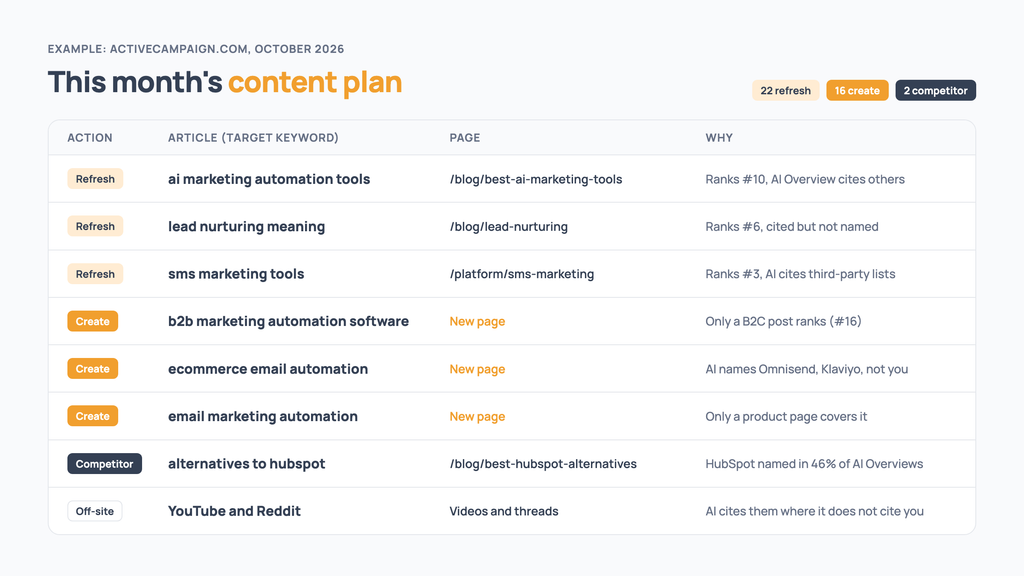
Here is what an agent’s monthly plan can look like.
Your agent in this guide is Claude Code, but the workflow works with any other AI assistant, as long as it can use tools, call an API and use skills.
Everything is explained below, so let’s get started.
Table of Contents
How the AI SEO content workflow works
The workflow splits into three layers, and each one has a single purpose.
1- The data layer
thruuu holds the data from your Topic Clusters project and your Google AI Overview report. It says which topics exist, where you rank, and what Google’s AI answer says about your brand and your competitors.
2- The intelligence layer
You confirm your competitors and your business priorities, and then the agent takes care of the plan. Your AI agent does the work on that data. In our example with Claude Code, three thruuu skills read the reports and build the content plan.
3- The execution layer
Once the plan is built, you make the final calls and define the articles to create: check the plan, pick the pages and move the pages you pick through thruuu’s Content Pipeline.
The thruuu Content Pipeline is the backbone of your content production. It automatically runs a deep search analysis of each topic and creates a content brief. You review each brief and start the draft generation. Once the drafts are ready, the last mile is to review them and publish them.
Once a month the loop runs again, and the agent compares the new plan with the last one.
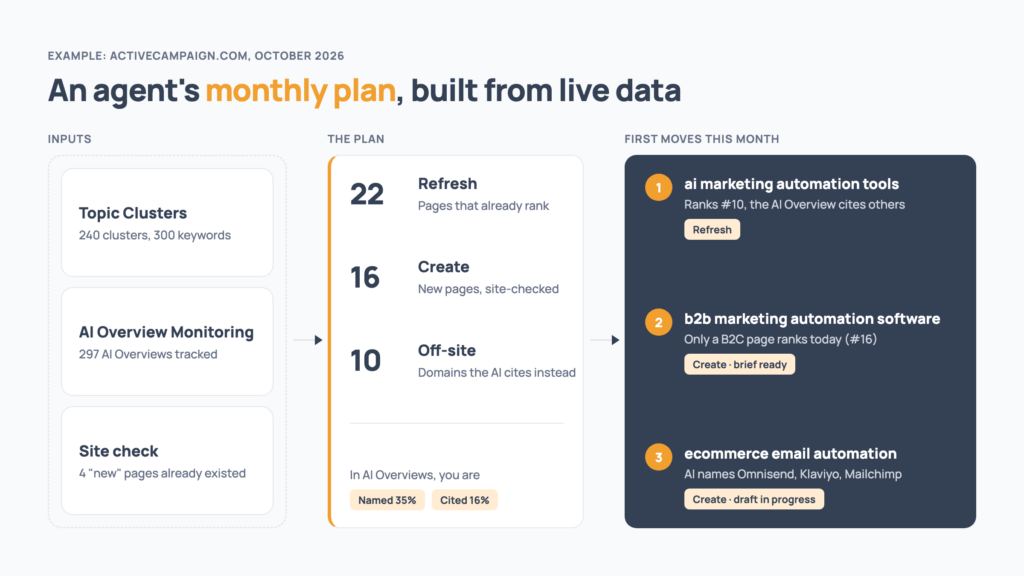
What you need before you start
- A thruuu Professional or Agency plan. AI Overview Monitoring and the Content Pipeline both start at Professional.
- A list of keywords for your domain of expertise
- Claude Code, installed and signed in
- git, to download the skills
- Python 3, with no packages to install. Type
python3 --versionin a terminal to check. - The thruuu SEO skills
Three SEO skills will be needed:
- thruuu-data-pull reads your Topic Clusters projects and AI Overview reports through the thruuu API.
- thruuu-content-strategy builds the plan: a prioritised list of pages to create or refresh, your visibility in AI Overviews against competitors, and guidance for each page.
- thruuu-content-pipeline sends the pages you choose to thruuu’s Content Pipeline, shows each brief in the chat for approval, and saves the finished drafts.
The skills are plain Markdown instructions plus small Python scripts, so they also run in any agent (such as Codex) that can read Markdown and run Python.
Note: don’t worry about the technical stuff, Claude will handle it for you.
Throughout this guide, the example is ActiveCampaign (activecampaign.com), a marketing automation platform. We follow it all the way, from the first report to three drafts in the pipeline.
Its keyword list started from a handful of seed keywords. We extracted the People Also Ask questions and related searches for each seed at scale with thruuu, then fed the results back in to reach the long tail.
We won’t detail how we got this list of keywords; we assume you know how to build one.
If you are interested, our method is explained step by step in our guide to building a content plan from PAA and related searches.
Step 1: Create a Topic Clusters and an AI Overview report
What you get: the two reports every later step reads, on the same keywords. One report holds the topics to cover, the other holds the insights about brands and sources.
This step happens in the thruuu app, not in Claude Code.
In thruuu:
- Create a Topic Clusters project. Paste your keyword list and set your domain, country and device.
- Create an AI Overview Monitoring report with the same keywords, country and device.
- Schedule the AI Overview report to run monthly, so each month’s plan has a fresh run to read.
What comes back:
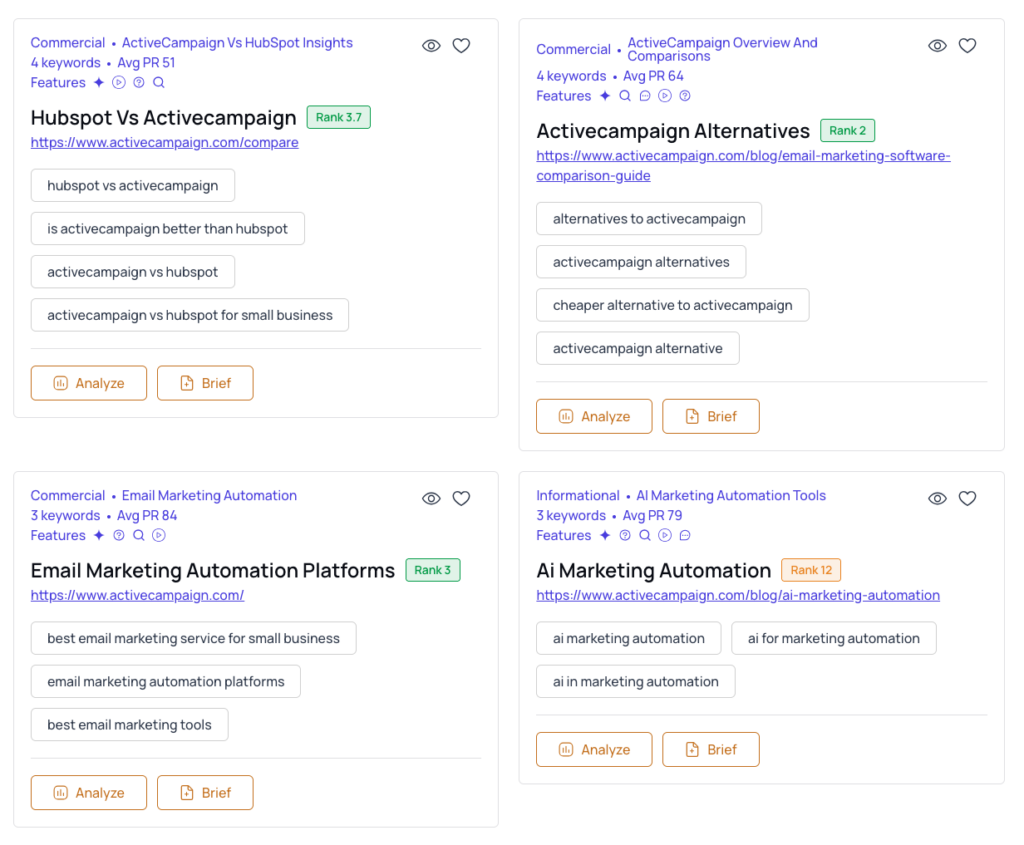
- The Topic Clusters project groups your keywords into topics and tells you which of your pages ranks for each. It helps you decide which new pages to create and which to refresh.
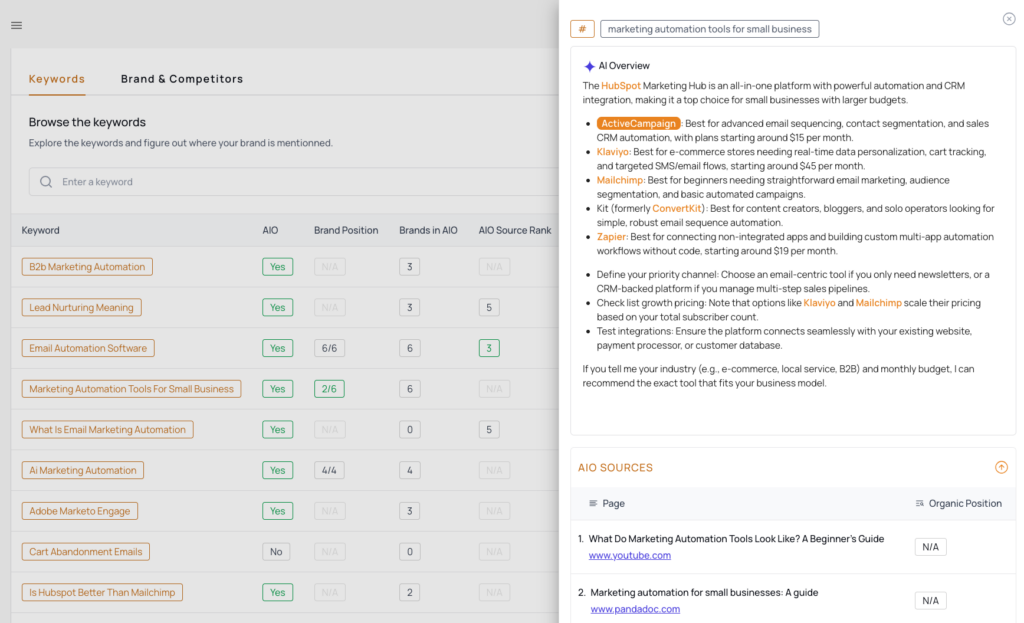
- The AI Overview report tracks where you rank on each keyword, what Google’s AI answer says, which brands it names and which sites it cites. It measures again on every run, so the plan can see what moved since last month.
Step 2: Install the thruuu skills in Claude Code
What you get: a folder where Claude Code finds the three skills and your API key.
Claude Code loads skills from the folder you open it in. So the first thing to make is that folder.
Paste into a terminal:
mkdir thruuu-workflow
cd thruuu-workflow
Everything from here happens inside thruuu-workflow. The plan, the drafts and the monthly history will live there too.
Still in that folder, download the skills and copy them to where Claude Code looks for them:
git clone https://github.com/thruuu/thruuu-skills
mkdir -p .claude/skills && cp -R thruuu-skills/skills/{thruuu-data-pull,thruuu-content-strategy,thruuu-content-pipeline} .claude/skills/
[ -f .claude/settings.local.json ] || printf '{\n  "env": {\n    "THRUUU_API_KEY": "your_key"\n  }\n}\n' > .claude/settings.local.json
What comes back: three folders inside thruuu-workflow/.claude/skills/, one per skill, and a settings.local.json file in thruuu-workflow/.claude/ waiting for your key.
The command copies only the three skills this workflow needs, even as more are added to the repository.
Next, the API key.
Create one in thruuu under Settings > API and copy it.
Open the settings file the command above created:
open -e .claude/settings.local.jsonReplace your_key with your key, keep the quotes around it, and save.
This file holds your key, so keep it private and out of any git repository you share.
Note: you can also ask Claude to do the setup for you. Then paste the key into the settings file yourself, rather than into the chat.
The skills are in place and the key is set. Now the agent can read your reports.
Step 3: Connect your agent and pull the data
What you get: a dated snapshot of both reports on your machine, read for free.
In your terminal, go back to your folder and start Claude Code:
cd thruuu-workflow
claude
Paste into Claude Code:
Check my thruuu API key.What comes back: OK for both APIs.
- A 401 means the key is missing or wrong, so check the file from Step 2.
- A 403 means your plan does not include API access.
Paste into Claude Code:
List my thruuu Topic Clusters projects and AI Overview reports for [yourdomain.com], propose the pair, and pull a snapshot of the latest AI Overview run. If the report has a run at least 28 days older, compare against it.What comes back: the pair the agent proposes, with the same domain, country, language and device. Say yes, and it pulls both reports into a dated folder inside thruuu-workflow.
In your first month you get one AI Overview run and no comparison, which is normal; from the second month on (a scheduled report, or a second run 28 or more days later), you get the comparison too.
Check: the pair is the one you built in Step 1, and the AI Overview run is the latest one.
The pull reads the Topic Clusters API and the AI Overview monitoring API, with GET requests only.
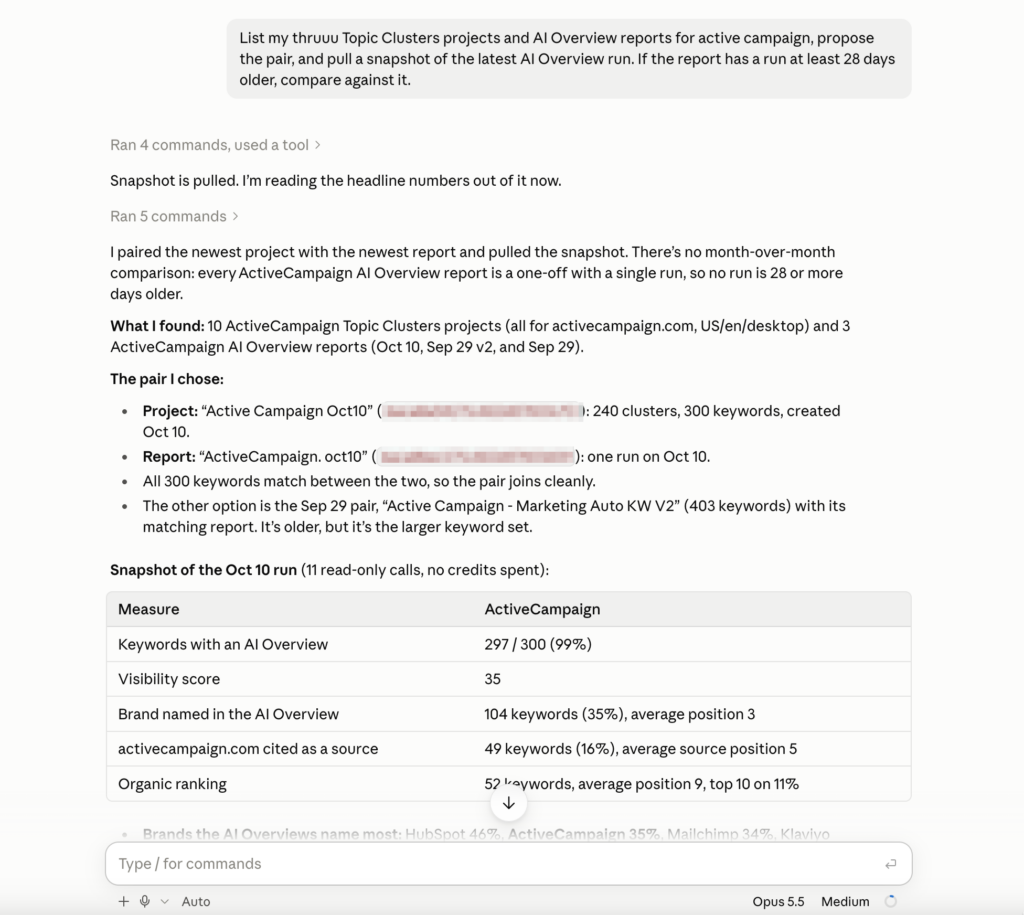
That was our first month: one AI Overview run, no comparison, and a snapshot read without spending a credit. Next, the agent needs to know your business.
Step 4: Answer five questions about your business
What you get: a business profile the plan is weighted by: your competitors, your revenue topics, your no-go terms.
Data can tell you what people search. Only you can say what matters to your business.
Paste into Claude Code:
Build a content strategy for [yourdomain.com] from that snapshot.What comes back: before any plan, five questions, pre-filled from the data:
- What do you sell, and to whom?
- Which of the brands the AI Overviews mention are real competitors? In the ActiveCampaign example, the agent proposed keeping HubSpot (named in 46% of the AI Overviews), Mailchimp (34%) and Klaviyo (27%), among others, and dropping Zapier, Shopify, WooCommerce and Google as platforms or partners. Only confirmed competitors count in the competitive numbers; platforms and integration partners usually do not.
- Do you want competitor pages (comparisons, alternatives, pricing)?
- Which topics bring revenue, and which are awareness only?
- Which topics should never get a page?
Answer the five questions in one message, then ask the agent to build the plan.
Paste into Claude Code:
Here are my answers: [your answers, or OK to accept the proposed ones]. Now build the content plan.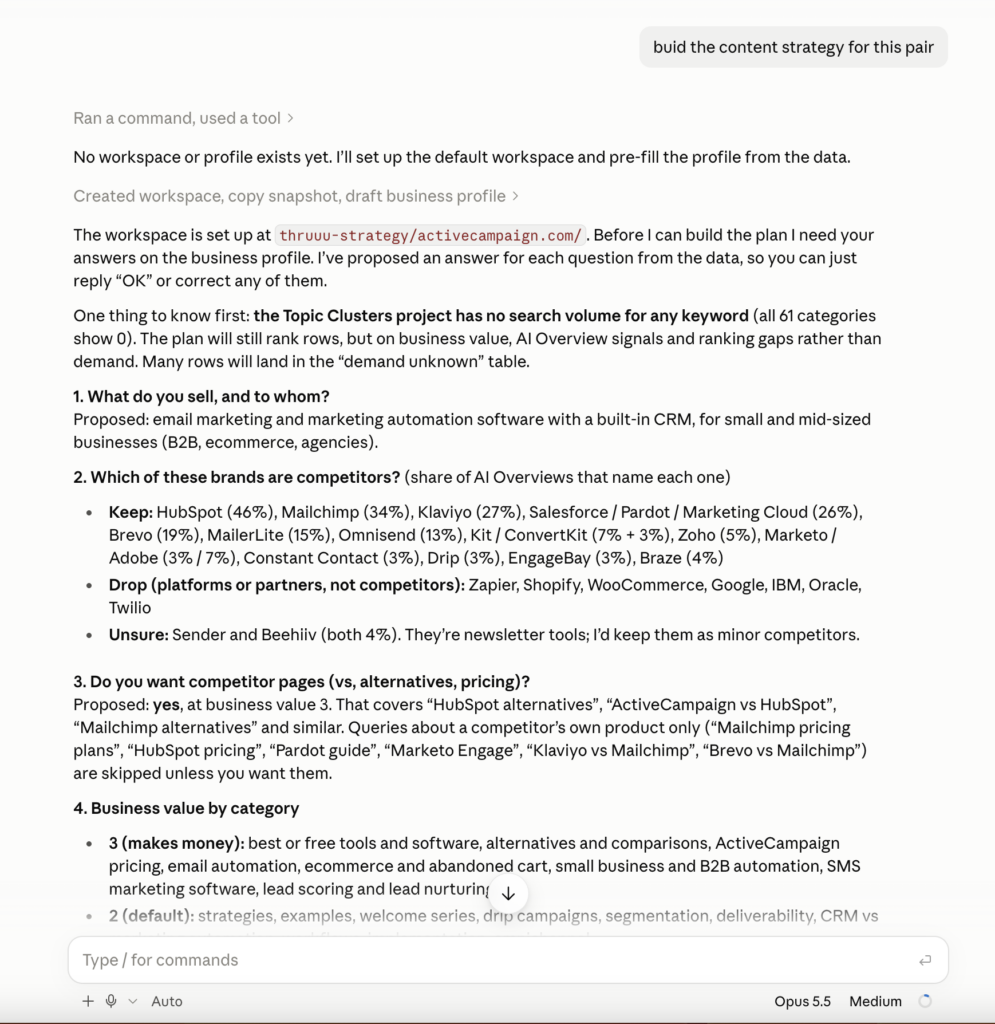
For ActiveCampaign, we accepted every proposed answer. With the profile saved, the agent had what it needed to build the plan.
Step 5: Decide what to create, what to refresh, and in which order
What you get: a ranked list of pages to create or refresh, with the reason for each.
As soon as the plan is built, the agent displays it in the chat with its top priorities, and saves it as two files: strategy-report.md, the report you read, and plan.csv, which holds every row.
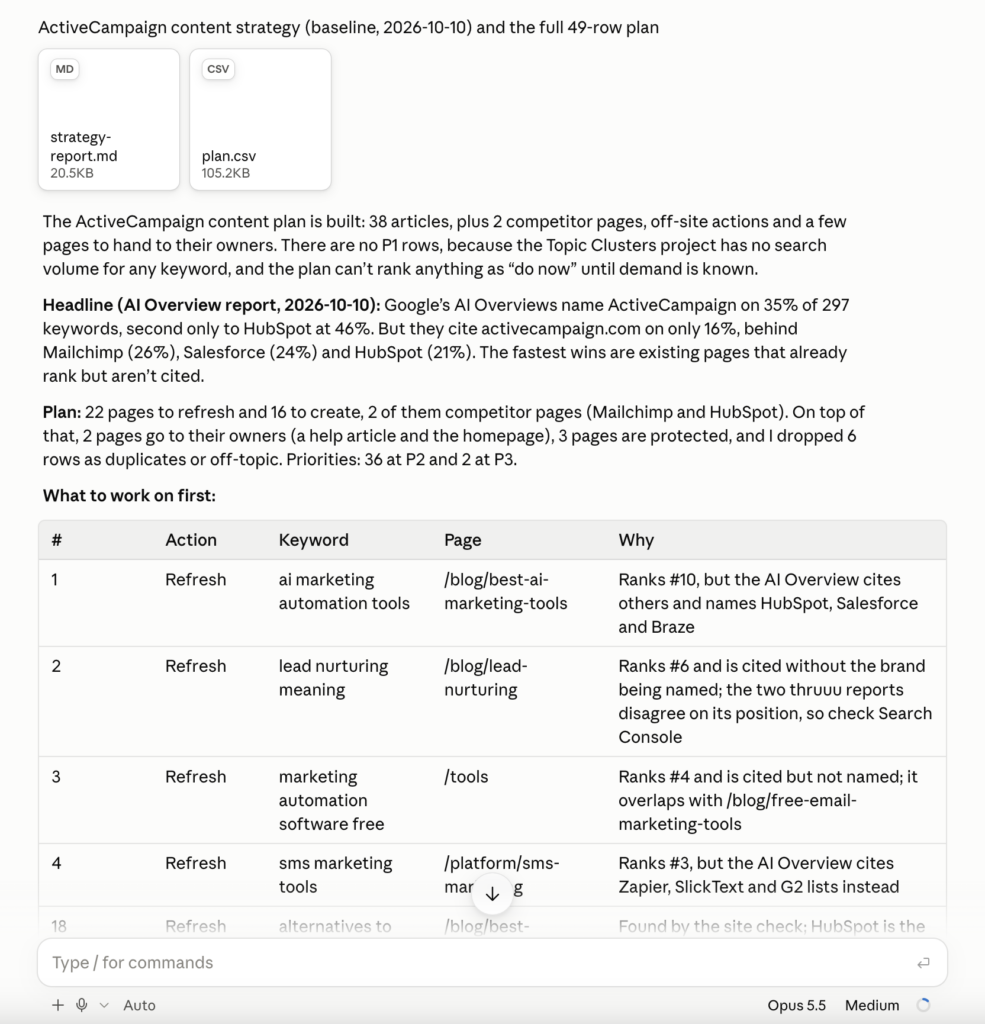
Our example project had no search volume, so 36 of the 38 articles landed in the same tier, “this quarter”, and nothing reached “do now”. With volume in your project, the order sharpens.
The next step is to explore the strategy report. It gives you an overview of every page to refresh or create.
Each page carries one decision, taken from your position on the topic’s main keyword:
| Decision | When |
|---|---|
| Create a new page | None of your pages ranks, or yours is beyond position 50 |
| Refresh (striking distance) | Your page is at 4 to 10 |
| Refresh (page two, or a rewrite) | Your page is at 11 to 50 |
| Refresh for the AI Overview | You are in the top 3, but the AI Overview names or links to someone else |
| Protect | You are in the top 3 with no AI Overview gap |
| Send to the page’s owner | The same kind of page already ranks in the top 10 |
| Skip | The topic is not one you want |
This is the short version. The full table in “How the plan is built” covers the rest, such as a help article that ranks outside the top 10.
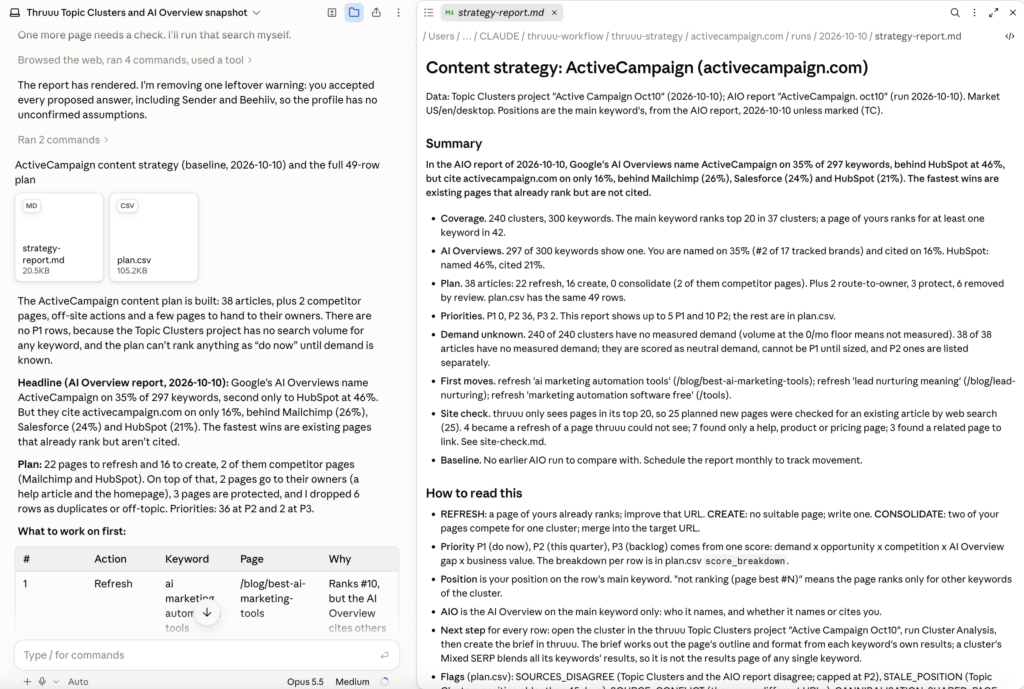
Before you trust a single “create” in that list, though, check that the page does not already exist.
The site check: find the existing page your reports cannot see
thruuu’s reports see your page only when it ranks in the top 20 (or deeper, up to 100) for a keyword they track.
An article can be indexed by Google and still be invisible to the reports, and a plan built on them alone would ask a writer to create a duplicate.
So before any new page is written, the agent searches your site for an existing article, for example site:yourdomain.com marketing automation roi. Without web search, it reads your sitemap instead.
A match turns “create” into “refresh that URL” only when it covers the same topic with the same intent on an article page.
Paste into Claude Code:
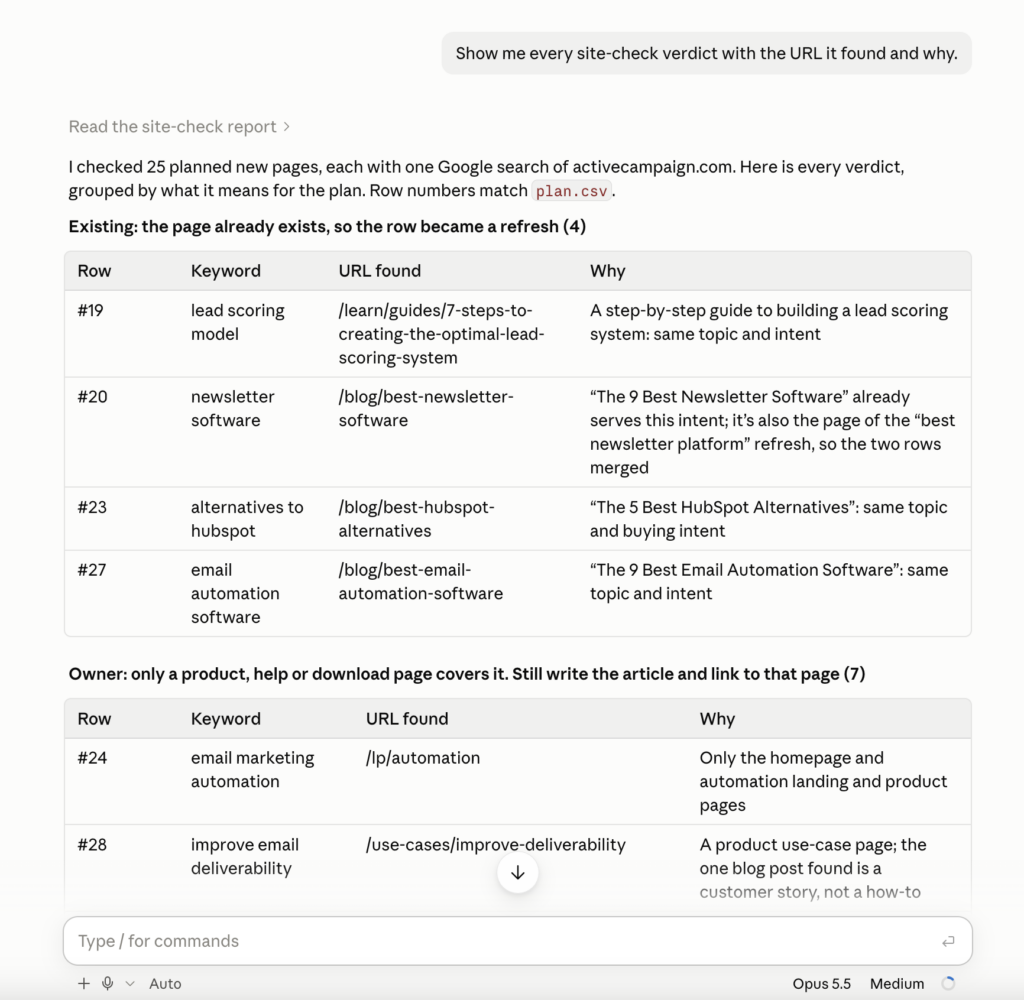
Show me every site-check verdict with the URL it found and why.What comes back: the list from site-check.md: each search, the URL found and the verdict.
Read it: you know your own site better than a search query does.
In the ActiveCampaign example, the check caught “alternatives to hubspot”. The plan wanted a new page, but the site already had The 5 Best HubSpot Alternatives (/blog/best-hubspot-alternatives), on the same topic with the same buying intent. The plan now refreshes that post instead of writing a second one.
Overrule any decision you disagree with
On top of the rules, the agent makes its own calls. It can:
- skip a row that does not fit your business
- move a page up or down a tier
- point out that a new page would compete with one you already have
Each of those changes is listed in the report with a short reason.
If one is wrong, say so.
Paste into Claude Code:
Keep row [7]: [we sell to that market]. Update the report.What comes back: the report again, with your change and your reason in it.
Add more data sources
Your agent runs in your own environment, so the thruuu reports do not have to be the only thing it reads.
If you have Google Search Console data, give it to the agent alongside the plan before you settle the create and refresh decisions.
The reports measure rankings and AI answers, not clicks or impressions. Search Console fills that gap in three places:
- A “create” row where Search Console shows one of your pages already earning impressions is probably a refresh.
- When the two thruuu reports disagree on whether a page ranks, Search Console settles it. The plan already flags those rows and asks for this check.
- Among the refreshes, the pages that already get traffic are the ones to protect while you change them.
Export the Search Console performance report for your site and put the file in your folder.
Paste into Claude Code:
Read [search-console-export.csv] in this folder. For every create row in the plan, tell me if one of my pages already gets impressions on its main keyword. Then check the rows the plan flagged for Search Console.What comes back: the rows where Search Console points to a different decision. Change the ones you agree with the same way as above.
The same goes for any other source you trust, such as an analytics export or last quarter’s editorial calendar.
Validate your content plan
The whole exercise is to review what the agent analysed, add more input and challenge the agent. Again, you know the business better than him.
So discuss with your agent, challenge him and finalize the content plan.
In the end, you will have article ideas to push to the Content Pipeline.
For ActiveCampaign, we asked the agent for the top three articles to create: B2B marketing automation software, ecommerce email automation and email marketing automation.
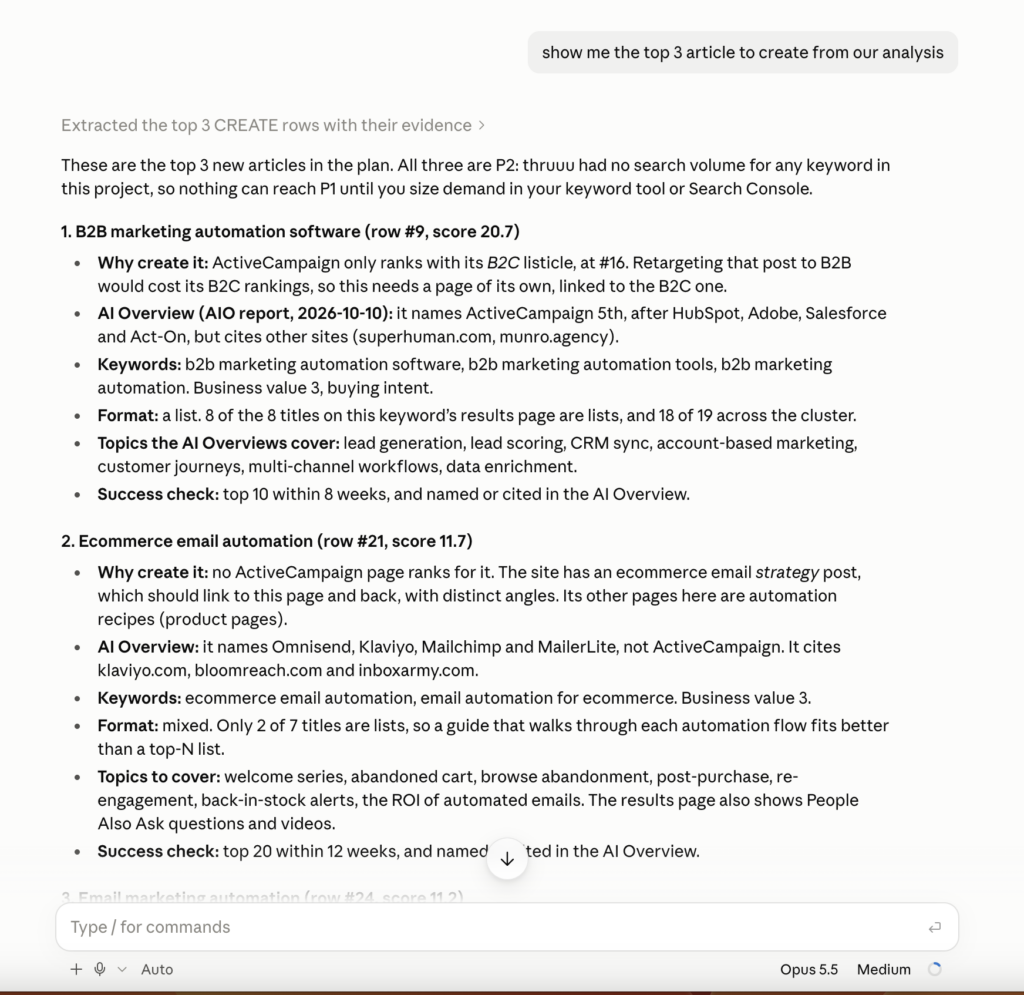
With three articles picked, the plan has done its job, and the work moves to thruuu.
Step 6: Start the content creation workflow
What you get: a brief and a draft for each page you pick, without running the research yourself.
At this step, you send the selected articles to thruuu’s Content Pipeline. The pipeline automates the research, the brief and the article. Well, it creates a draft that you need to review. And before that, there is a first review to do: the content brief.
The thruuu Content Pipeline flow works like this:
- you add keywords
- thruuu analyses search and AI search
- thruuu creates a brief
- you review the brief
- thruuu creates a draft
- you review it and publish it.
With the plan settled, hand the pages to thruuu’s Content Pipeline in five moves.
1. Send the top pages to the pipeline.
You can name either the rows or the articles’ target keywords. Also name the thruuu workspace whose Content Pipeline should receive the articles; otherwise the agent looks for one and may ask.
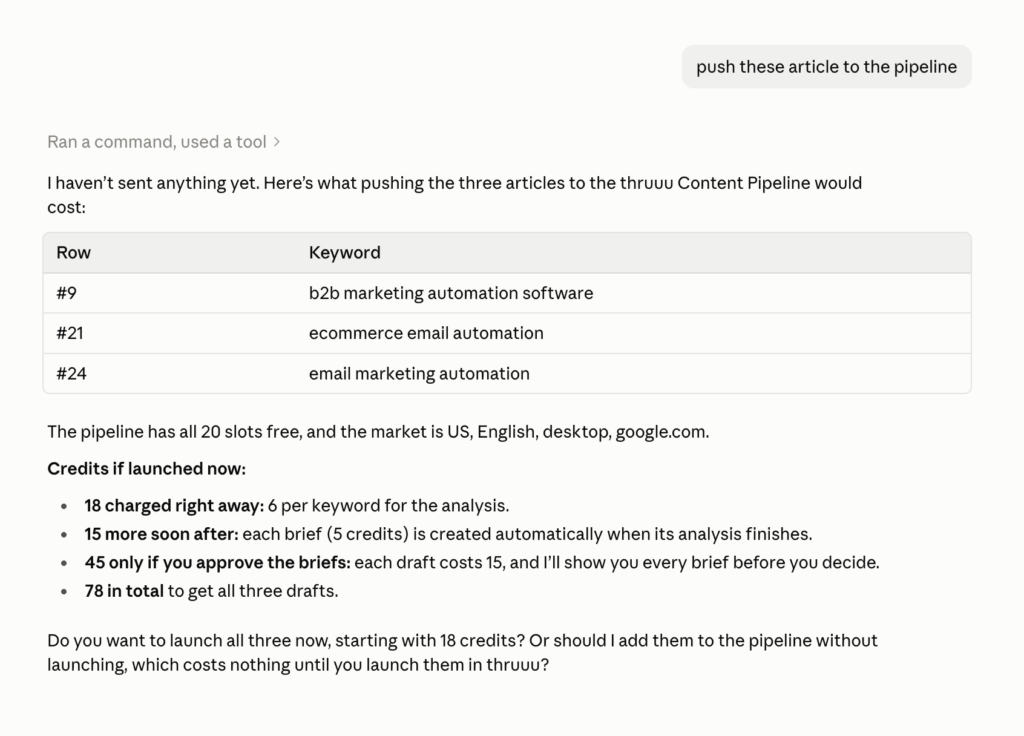
Push the articles for [keyword 1], [keyword 2] and [keyword 3] to the thruuu Content Pipeline and launch them.The agent shows the cost first and waits for your yes. The skill states the credits live, before each spend.
Note that you can change the search parameters and also include an LLM analysis: just say you want ChatGPT or Gemini analysed on top before starting.
The first command that spends credits also stops for approval in Claude Code itself. In our run, auto mode blocked it until we said “run it”. That is expected: approving it lets it through.
2. Wait for the briefs.
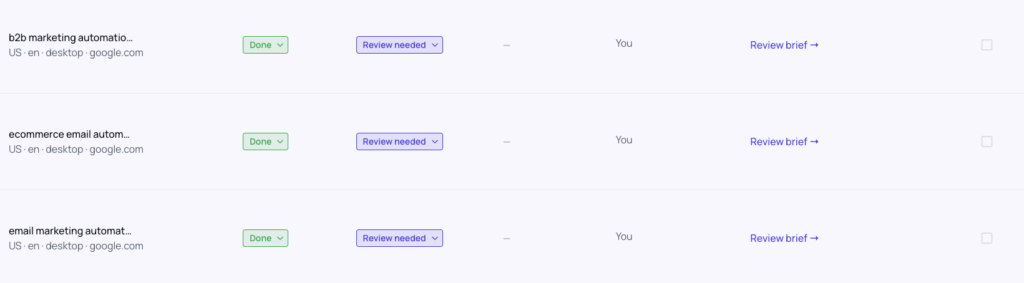
The brief follows the analysis by itself. You can check the Content Pipeline in thruuu or ask Claude for the status. In our run, all three came back marked “Review needed”.
3. Review each brief.
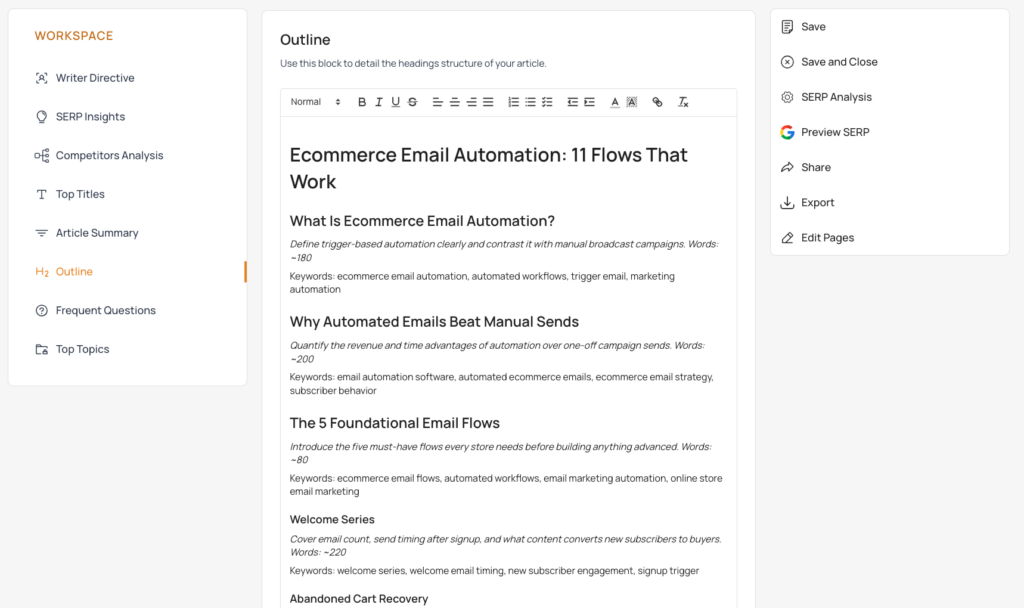
Show me the brief for [keyword].You get a short summary in chat: title, meta description, outline headings, key questions, main points. You can also open it in thruuu and edit it.
The draft is written from whatever the brief says when you approve it, so changing the angle there takes a minute and changing it afterwards takes an afternoon.
This is the step that matters most. Fine-tune each brief: add notes to the outline, and guide the writer with the Writer Directive block. If you can, also create a Brand Kit, so the content follows your brand identity.
4. Approve.
Approve row [3].This starts the draft. The agent shows the cost and waits for your yes. Nothing is approved without you asking.
5. Collect the drafts.
Ask your agent:
Save the ready drafts as Markdown, then archive them in thruuu.Each finished draft is saved next to the plan, under its SEO title, as Markdown or Word. Archiving frees its slot.
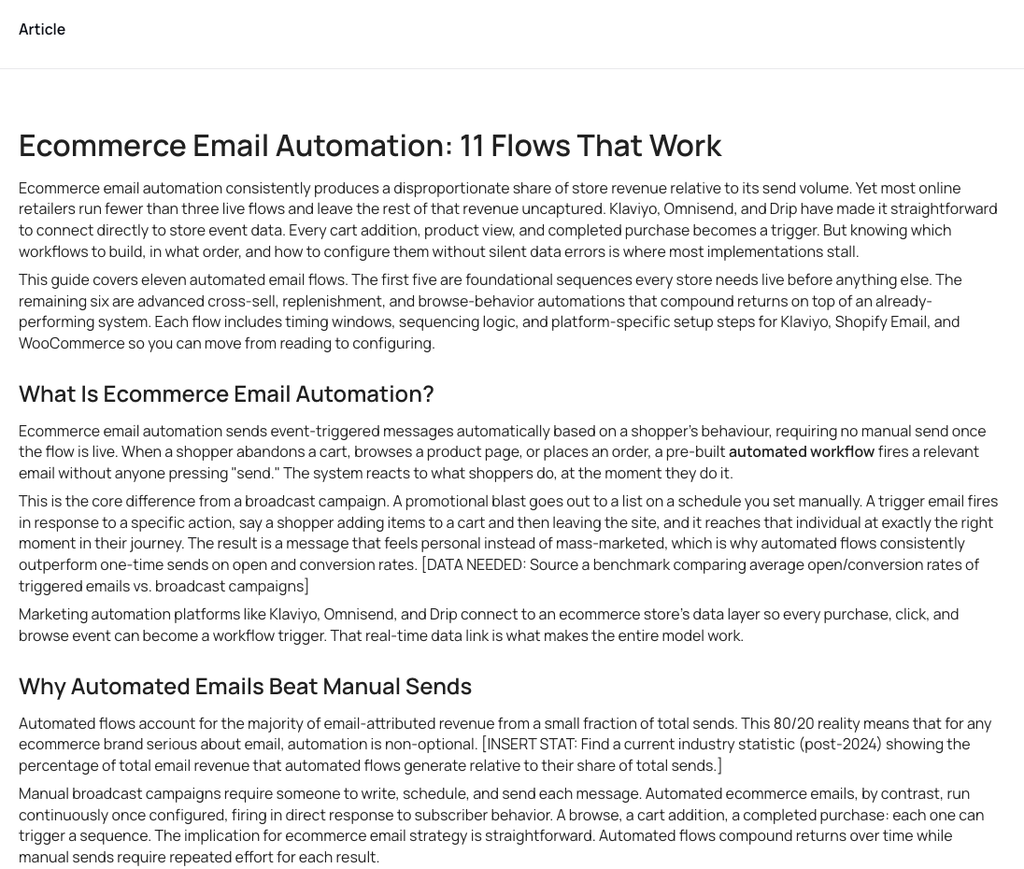
The drafts sit in your folder now, next to the plan that chose them. The last step is the one no tool takes for you.
Step 7: Review the draft and publish it yourself
What you get: a page you can put your name on.
thruuu stops at a draft.
What happens next is the part no report covers:
- Check the facts and the figures. The draft was written from the search results and from the brief, not from your product.
- Add what only you have. Your own data, screenshots, customer examples, and the internal links to the rest of your site.
- Publish it in your CMS. thruuu does not touch your site.
You can watch the full tutorial here.
Every month: rerun the workflow and compare
What you get: this month’s plan, and what changed since the last one.
Once the AI Overview report has run again, open Claude Code in your folder.
Paste into Claude Code:
Pull this month's thruuu snapshot for [yourdomain.com], rebuild the content strategy with my saved answers, and compare it with last month's plan.What comes back: the new plan, and a file called changes.md. It opens with wins:
- pages that reached their goal
- new pages that now rank
- pages that moved into the top 3
- AI Overview mentions and links gained
Then come the goals still in progress, your competitors’ movement in AI Overviews, pages that moved up or down the list, new pages, and pages that left the list with the reason.
Every page carries a goal, so progress is measured, not guessed. Two examples:
- a refresh at striking distance: in the top 3 within 8 weeks
- a new page: in the top 20 within 12 weeks
As work ships, record it, so next month’s plan knows what you did:
Mark row [3] as published and row [5] as in progress.The statuses live in a small ledger file the agent keeps for your domain.
| How often | What | Why |
|---|---|---|
| Monthly | The AI Overview report runs, the plan is rebuilt and compared with last month | Rankings and AI answers move every month |
| Quarterly, or when your keyword list changes | Re-cluster the Topic Clusters project in thruuu | Its positions are a snapshot; after 45 days the plan flags them as stale [VERIFY: 45 days] |
| As work ships | Mark each page planned, in progress, published or dropped | So next month’s plan knows what you did |
You can of course add more keywords over time. Compare percentages rather than counts when you do.
How the plan is built
The full decision table
Each topic is judged on one number: your position on its main keyword, from the most recent measurement. The table is read from the top, and the first line that matches decides.
| Your situation | What to do | Why |
|---|---|---|
| The topic is one you never want a page for, or a query about a competitor’s own product with no comparison intent | Skip it | Not your topic, or traffic you do not want |
| None of your pages ranks for any keyword in the topic | Create a new page | Nothing to improve yet (after the site check) |
| Only your homepage, a help article, an archive page, a product page on an informational topic, or a page about something else ranks, outside the top 10 | Create a dedicated page | That page cannot be reshaped for this topic without hurting its own job |
| The same kind of page ranks in the top 10 | Keep it, and send the work to the page’s owner | Google already likes it; a new article would compete with it |
| Your page ranks for other keywords of the topic, but not the main one | Refresh that page to cover the main keyword | The page is already relevant |
| Main keyword in the top 3, and the AI Overview names competitors but not you | Refresh for the AI Overview | You win the click but lose the AI answer |
| Main keyword in the top 3, and the AI Overview names you but links to someone else | Refresh to win the link | The AI recommends you and sends the reader elsewhere |
| Main keyword in the top 3, and the AI Overview links to you without naming you | Refresh to put your name in the answer | Your page is used, your brand is not |
| Main keyword in the top 3, no AI Overview gap | Protect: watch it, no work | Changing it risks more than it gains |
| Main keyword at 4 to 10 | Refresh (striking distance) | The fastest return: a refresh moves these in weeks |
| Main keyword at 11 to 20 | Refresh (page two) | Close enough that a refresh beats a new URL |
| Main keyword at 21 to 50 | Refresh with a rewrite | The page still has relevance worth keeping |
| Main keyword beyond 50 | Create a new page | Too far to recover |
| Any “create” above, when the site check finds your existing article | Refresh that article instead | The page exists; it just ranks lower than the reports can see |
Why the AI Overview lines matter: brands cited in an AI Overview get about twice the organic click-through rate on those searches (Seer Interactive, April 2026).
Google says AI Overviews use its normal ranking systems and need no special markup (Google Search Central), so winning them is content work: direct answers, question headings, self-contained passages, original data.
From topics to pages
A good practice is to create one article per topic. But keyword clustering is precise, so many topics hold a single keyword: 196 of the 240 topics in the ActiveCampaign project.
Those topics are not thrown away.
The agent folds each one into the closest page, one that shares a distinctive term with it, usually as a section. You can ask the agent at any time which topics went into which page.
Here is how topics become pages:
- Existing pages: one row per URL, covering every topic it serves. When two of your articles compete for the same topic, the plan suggests merging them into one.
- Competitor pages: all the comparison and alternatives searches about one competitor become one page.
- New pages: one main page (a hub) per category. Topics that share its subject, and small questions, become sections of it.
- Pages you do not own: help, product and home pages that rank go to their owners, not into the editorial plan.
How a page earns “do now”
Each page gets a score from five things:
- its monthly searches
- how quickly the work can pay off: a page at #4 to #10 first, then page two, then AI Overview fixes, then new pages
- how strong the sites already ranking are, compared with yours
- any AI Overview gap
- the business value from your answers in Step 4
“Do now” also needs at least 1,000 measured searches a month, and “this quarter” at least 200, or no measured demand at all.
The scores come from a script, so the same data always gives the same order. The agent’s overrides in Step 5 are the only judgement on top.
AI Overview share of voice
thruuu AI Overview monitoring tool measures how often the AI names you and how often it links to your site, against each confirmed competitor, across the keywords that show an AI Overview.
In the ActiveCampaign example, on the run of 10 October 2026, the AI Overviews named ActiveCampaign on 35% of the keywords and cited activecampaign.com on 16%, against 46% and 21% for HubSpot.
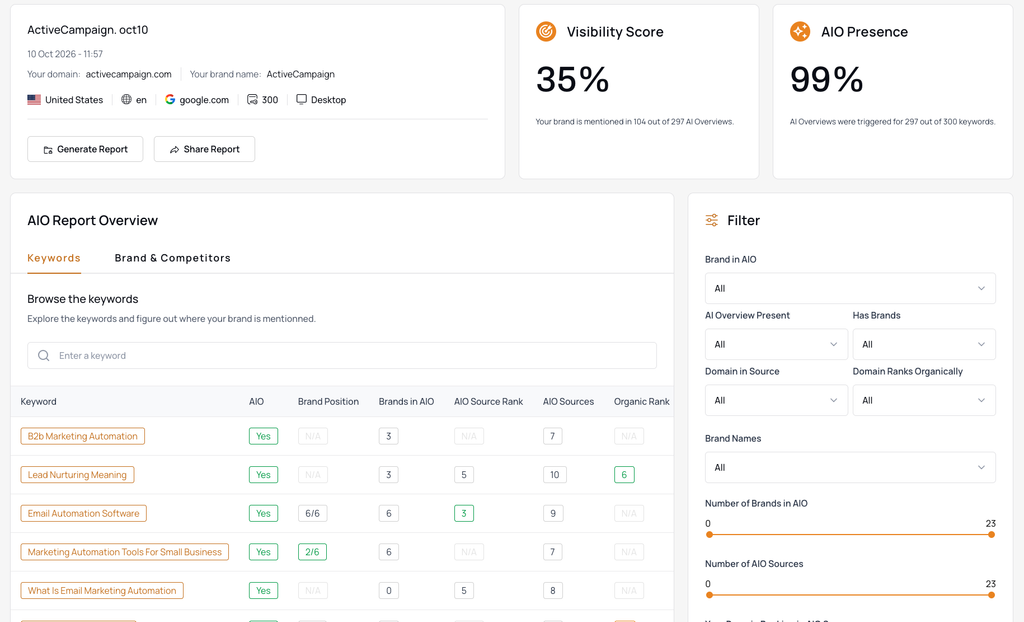
It also lists who the AI quotes instead of you.
When those are YouTube videos, forum threads, review sites or third-party listicles, no article on your own site will win the link, so the plan lists them as off-site actions: publish videos, answer in the threads, complete your review profiles, pitch the listicle authors.
The content plan template: what plan.csv holds
plan.csv is the template you work from. It holds every row, not only the priority ones, with its action, target keyword, URL, current position, demand, AI Overview situation, score breakdown and reason.
Four columns are the ones a writer opens:
- next_step: what to do with this row in thruuu, from running Cluster Analysis to pushing it to the Content Pipeline.
- aio_themes: the themes Google’s AI Overview covers on that keyword.
- content_guidance: a few lines of evidence to steer the article.
- site_check: the existing URL found on your site, and the verdict on it.
The guidance is not a brief. It never writes the outline, headings, title or word count; thruuu’s content brief generator does that from the live search results.
It says which format the results reward, which brands and themes the AI Overviews mention, and which search features appear.
For the example’s ecommerce email automation, that came to a mixed format (only 2 of 7 titles are lists, so a guide that walks through each flow fits better than a top-N list), an AI Overview that names Omnisend, Klaviyo, Mailchimp and MailerLite but not ActiveCampaign, themes such as welcome series, abandoned cart and back-in-stock alerts, and People Also Ask questions and videos on the results page.
Under the hood: the API calls behind each step
The goal of this article is to show you a workflow and how to use thruuu to build your own. If you would rather build your own agent than use the skills, these are the calls it needs.
- Topic Clusters API: GET /api/v2/topic-clusters lists your projects. /topic-clusters/{id}/clusters returns every topic with its volume, intent, isRanking, avgPosition and bestPageUrl, and /domains gives the competing domains with their PageRank.
- AI Overview Monitoring API: GET /api/v2/aio-reports finds the report and /runs lists its runs. /runs/{resultId}/keywords?include=aiOverview returns per-keyword positions, the brands the AI named, its sources and its themes; swap in include=topOrganicResults for the exact top 10 of one keyword.
- Content Pipeline API: POST /api/v2/pipeline/items pushes a keyword into a workspace’s pipeline, GET follows it through analysis and brief, the review endpoint approves, and the draft comes back out.
Frequently asked questions about AI SEO content
What is SEO content creation?
SEO content creation is writing or updating a page so that it answers one specific search well enough to rank for it. In practice it is four decisions taken before anyone writes: which keyword the page targets, whether a page for it already exists on your site, what format the search results reward, and which questions the page has to answer. The writing is the last step in the sequence, not the first.
How do you blend AI and human writing?
Split the work by what each side actually knows. Reading the data is machine work, because there are hundreds of keywords, positions and AI answers in a single month and nobody gets through them by hand. The decisions are yours: which brands are real competitors, which topics earn revenue, and whether the finished page is true. In this workflow the seam has a name and a screen. It is the brief approval.
Does AI content rank on Google?
Yes, and Google says so itself: it rewards high-quality content however it was produced, and judges the page rather than the tool that made it (Google Search Central, February 2023). The same guidance is clear about the limit. Using automation to generate content mainly to manipulate rankings is a spam policy violation. A draft built from a brief that came out of the live search results, then fact-checked and given something of your own, sits on the right side of that line. A hundred pages published unread do not.
Will AI content hurt your rankings?
Publishing at volume without review will, and the mechanism is usually not the AI. It is duplication. A plan built on keyword data alone asks for a new page on a subject you already cover at position 35, and then two of your pages compete for the same search. That is what the site check in Step 5 exists to prevent. The second failure mode is a wrong figure in a published draft, which costs trust rather than a position, and takes longer to win back.
How much editing does AI-generated content need?
Enough that you would put your name on it. There is no honest average, and the number that matters is not how many words you changed but how many claims you had to check. Structure and coverage usually survive nearly intact, because they came from a brief you already read and approved. Everything specific to you gets rewritten or written from scratch. If a draft comes back needing a different angle rather than better facts, the editing is not the problem: the brief was approved too fast.
Ready to build your first AI SEO content plan?
Set up a Topic Clusters project and an AI Overview report on the same keywords, install the skills, and next month’s editorial meeting starts from a list instead of an argument.