

Which SEO tools can your AI assistant call once thruuu is connected?
The thruuu MCP server gives Claude, ChatGPT, Codex and other AI assistants 49 tools that run on your thruuu account: live SERP data, AI Search, topic clusters, briefs, drafts and access to a streamlined content pipeline.
With these tools, your assistant can:
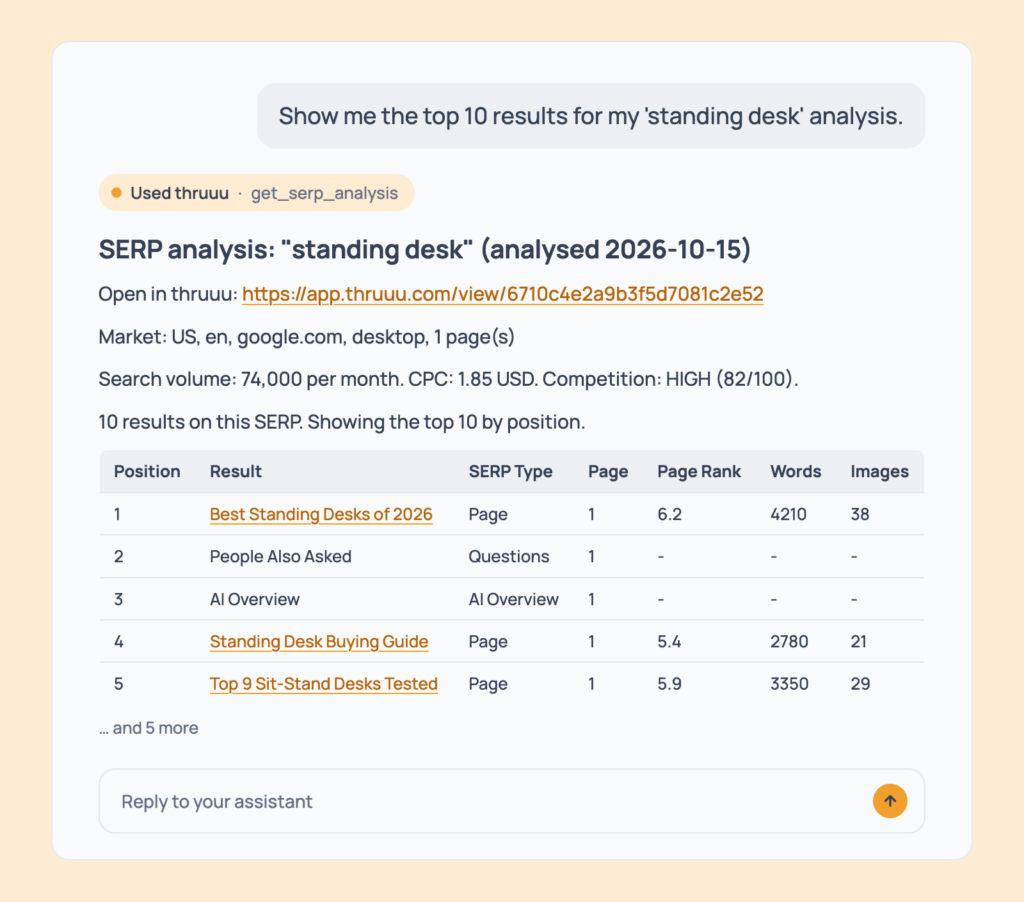
- Run a SERP analysis and read the ranking pages, People Also Ask and the AI Overview
- See what ChatGPT, Gemini, Perplexity and Google AI Mode answer for a keyword, and which sources they cite
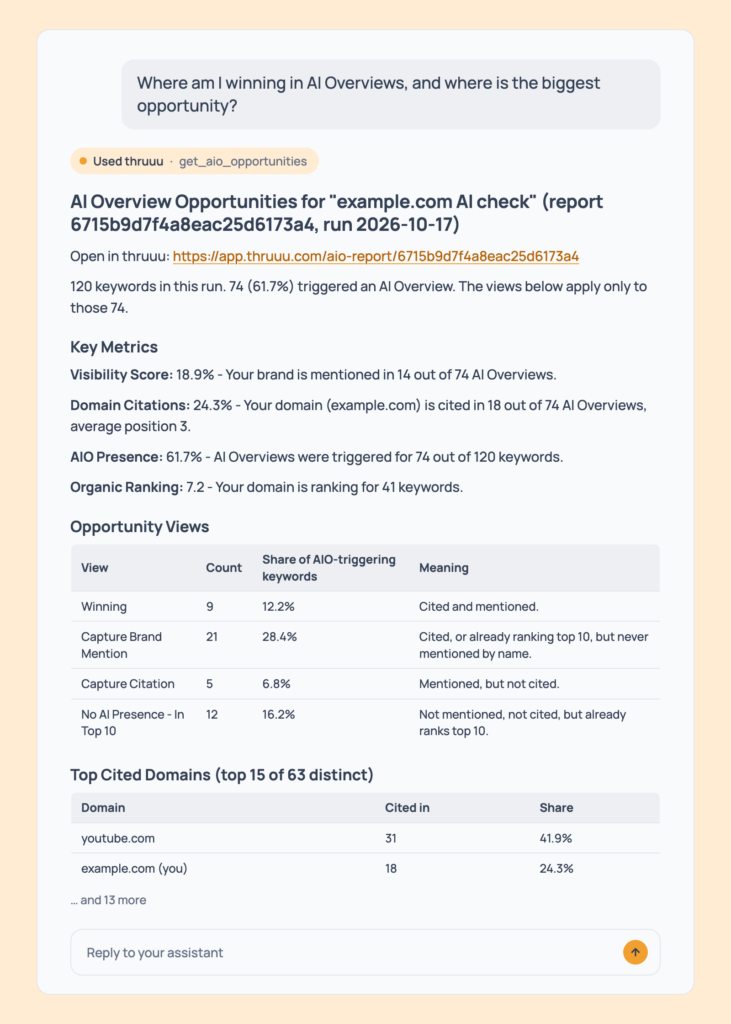
- Check whether Google’s AI Overviews cite your domain or name your brand
- Group keywords into topic clusters and find the ones you do not rank for
- Pull every People Also Ask question and related search across a topic cluster in one call
- Create a content brief, edit it and rewrite its outline in a new style
- Streamline and scale your content production with the thruuu content pipeline feature
You keep working in the assistant you already use, and it answers from live search data and your own thruuu projects.
What are MCP tools?
MCP tools are the functions an MCP server exposes for an AI model to call. In the Model Context Protocol, each tool has a name, a description and a schema for its inputs. The assistant reads the list and picks the tool that fits your request.
With thruuu, you never type a tool name. Ask “What is the search intent behind ‘standing desk’?” and the assistant calls get_serp_analysis for you. The names below help you check what a tool does, or recognise the one your assistant just called.
Three rules apply to all 49:
- Listing, reading, comparing and checking are free, and that includes the SERP data itself.
- A tool that uses credits states the cost first and waits for your yes.
- The MCP is open to every plan, and a tool your plan does not include replies with a short upgrade note and charges nothing.
For ideas on what to ask, see 141 SEO prompts that run on live SERP data, each with the output it returns.
The tools below are grouped by job. Each table gives a tool’s credits, its minimum plan and a prompt that calls it.
SERP research tools
These ten tools run SERP analyses and read them back: who ranks, how their pages are built, what searchers ask, and a strategic report on top.
| Tool | What it does | Credits | Minimum plan | Example prompt |
|---|---|---|---|---|
start_serp_analysis | Analyses one keyword: rankings, page structure, People Also Ask, the AI Overview and, if you ask, AI engine answers | 1, plus 1 for search volume, plus 1 per AI engine | Every plan. Free runs US, English, desktop, first page | “Run a SERP analysis for ‘best project management software’ in the US.” |
list_serp_analyses | Lists your analyses, newest first, by keyword or workspace | Free | Every plan. Free and trial accounts see the last 30 days | “Do I already have an analysis for ’email marketing’?” |
get_serp_analysis | Reads one analysis: top results, outlines, questions, topics, related searches, AI Overview, engine answers, intent, page details, FAQ, links and SERP features | Free | Every plan. Outlines: Pay as you go. Search intent, content analysis, AI Overview and engine answers: Professional | “What questions do people ask around ‘standing desk’?” |
run_search_intent | Starts the search intent analysis on an existing SERP analysis | Free | Professional | “Run the search intent analysis on my ‘standing desk’ analysis.” |
run_heading_analysis | Starts the heading analysis on an existing SERP analysis | Free | Pay as you go | “Run the heading analysis on my ‘standing desk’ analysis.” |
run_content_analysis | Starts the content analysis on an existing SERP analysis | Free | Professional | “Run the content analysis on my ‘standing desk’ analysis.” |
get_serp_similarity | Compares two analyses and says whether the keywords need one page or two | Free | Every plan | “Should ‘running shoes for flat feet’ and ‘best flat foot running shoes’ be one article or two?” |
trigger_analysis_agent | Starts the Analysis Agent’s nine-section strategic report | 5 | Agency, or free on an analysis created during your trial | “Run the Analysis Agent on my ‘best crm’ analysis.” |
list_analysis_agent_reports | Lists your strategic reports and their status | Free | Every plan | “Which of my keywords already have a strategic report?” |
get_analysis_agent_report | Reads a strategic report | Free | Every plan | “Give me the strategic report for ‘best crm’.” |
AI Search tools
AI engine answers come through the SERP tools above. start_serp_analysis captures ChatGPT, Gemini, Perplexity and Google AI Mode when you include them (1 credit per engine), and get_serp_analysis reads back each answer and its sources. ChatGPT is available from Professional, all four engines on Agency.
The six tools below track Google’s AI Overview across a whole keyword list.
| Tool | What it does | Credits | Minimum plan | Example prompt |
|---|---|---|---|---|
detect_aio_brand | Reads your site and suggests the brand name and aliases to track | Free | Professional | “What brand name and aliases would you track for example.com?” |
create_aio_report | Checks up to 500 keywords for AI Overview citations of your domain and mentions of your brand. Runs once | Keywords divided by 20 (top 20 results), 10 (top 50) or 5 (top 100), rounded up | Professional. Sub-paths and extra aliases: Agency | “Create an AI Overview report for example.com with these 120 keywords, US English, desktop.” |
list_aio_reports | Lists your reports with domain, brand and status | Free | Every plan | “List my AI Overview reports.” |
list_aio_runs | Shows each run’s visibility score, citations and AI Overview presence | Free | Professional | “How has the visibility score of my main AI Overview report changed over its runs?” |
get_aio_opportunities | Shows where you are cited, where you are only named, and where a citation or mention is within reach | Free | Professional. Mention-based views and top mentioned brands: Agency | “Which keywords mention my brand but do not cite me?” |
get_aio_keyword | Reads one keyword’s full AI Overview, its sources and the top 10 organic results | Free | Every plan | “Show me the full AI Overview for ‘best crm for small business’ and its sources.” |
The assistant confirms your domain, brand, aliases, keywords, market and cost before it creates a report. It cannot start scheduled monitoring from the chat.
Topic cluster tools
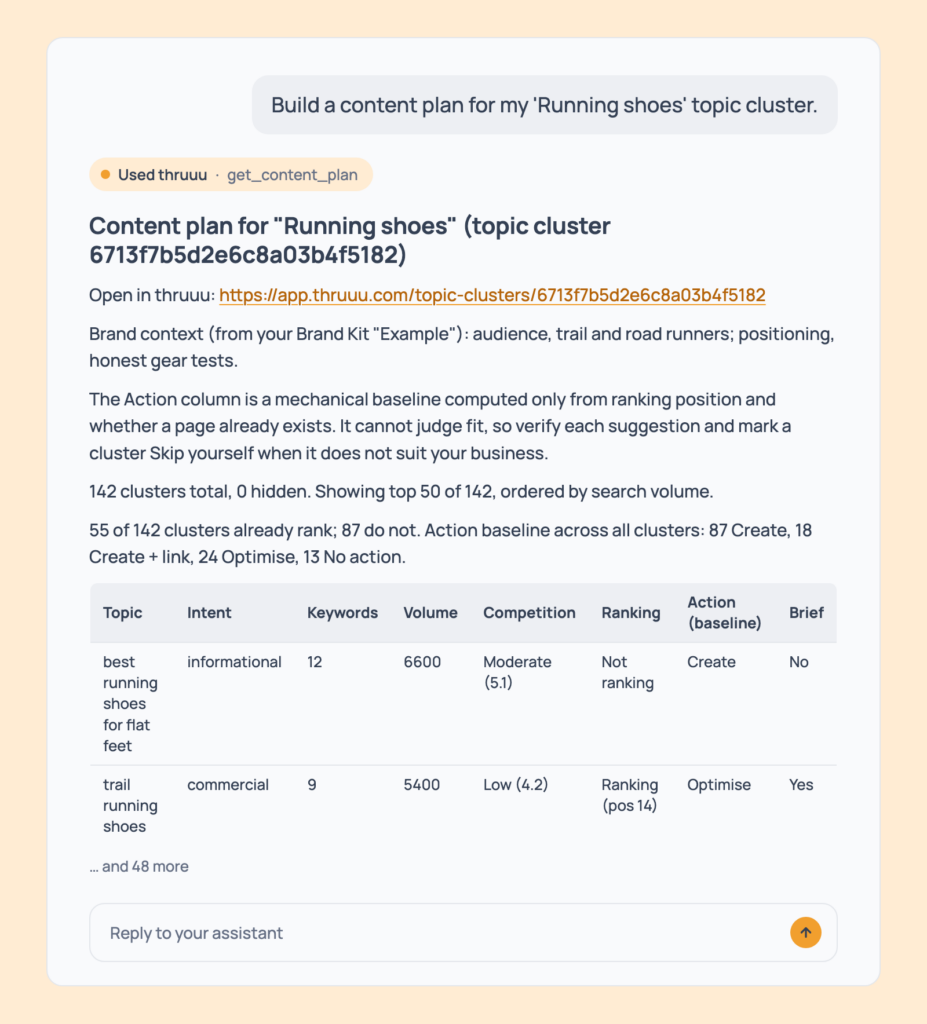
These tools group a keyword list into clusters and turn the result into a content plan.
Add your domain when you create the cluster to see where you already rank.
| Tool | What it does | Credits | Minimum plan | Example prompt |
|---|---|---|---|---|
create_topic_cluster | Groups up to 2,000 keywords into clusters (500 on a trial) and shows where your domain ranks | Keywords divided by 20, 10 or 5 depending on results per keyword, rounded up | Pay as you go. The overlap setting: Professional | “Group these 300 keywords into topic clusters for example.com, US English, top 20 results.” |
analyze_cluster | Collects the ranking pages for a cluster that has not been analysed yet | 1, charged only if it completes. Free if already analysed | Pay as you go | “Analyse the ‘trail running shoes’ cluster so I can see its results.” |
list_topic_clusters | Lists your topic clusters with their status | Free | Every plan | “List my topic clusters.” |
list_clusters | Lists every cluster inside one topic cluster, with its keywords, volume, Avg PR, SERP features and whether you rank | Free | Every plan. Needs a target domain to show gaps | “Which clusters am I not ranking for? Biggest volume first.” |
get_content_plan | Builds a create, optimise or skip table, filtered by volume, intent, category or SERP feature | Free | Pay as you go. Brand Kit context: Professional | “Build a content plan for my ‘Running shoes’ topic cluster.” |
get_cluster | Reads one cluster: merged top results, plus outlines, questions, intent and keywords on request | Free | Every plan | “Show the top results for the ‘trail running shoes’ cluster.” |
get_topic_cluster_questions | Lists every People Also Ask question and related search across a whole topic cluster, most frequent first, with the clusters each one comes from | Free | Every plan | “What questions do people ask across my ‘Running shoes’ topic cluster?” |
The assistant takes up to 2,000 keywords (1,500 with the top 100 results, 500 on a trial). For larger lists, use the upload in the thruuu app.
Content brief and outline tools
Thirteen tools create briefs, read them, edit them and control the shape of the outline.
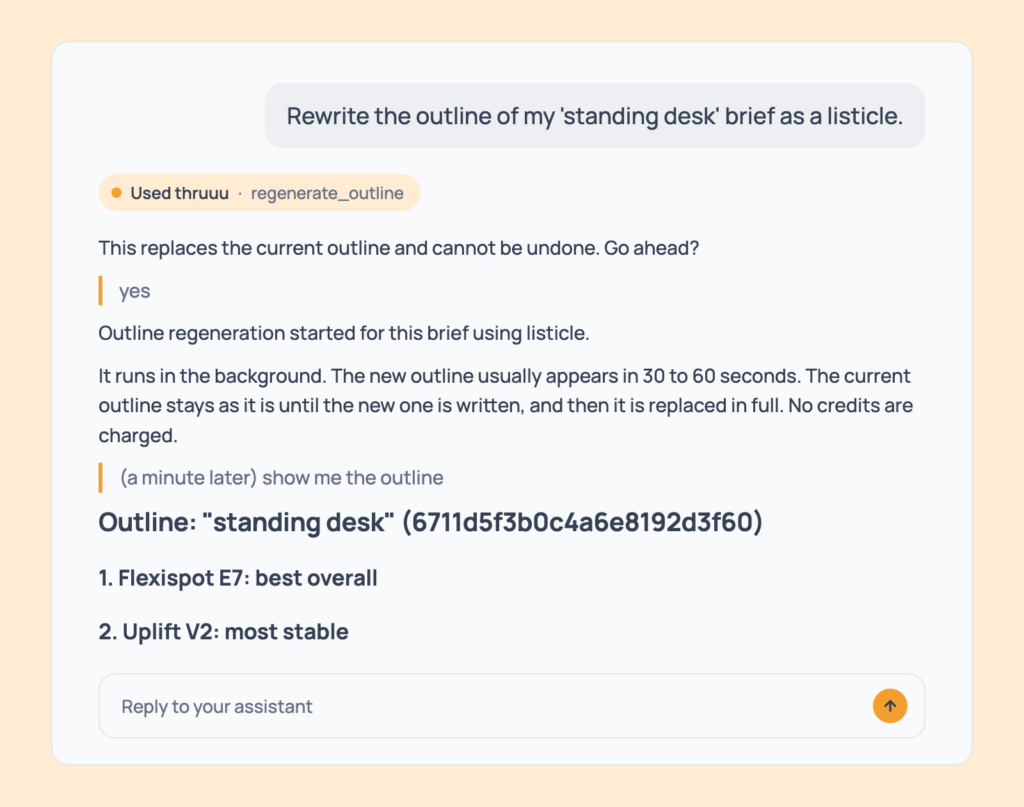
Edits are free, but update_brief and update_outline have no undo, so the assistant checks with you first.
| Tool | What it does | Credits | Minimum plan | Example prompt |
|---|---|---|---|---|
create_brief | Runs a SERP analysis and builds a brief with a title, description and outline | 5, plus 1 for search volume | Every plan. Templates and market choice: Pay as you go | “Create a content brief for ‘how to start a podcast’ in the US.” |
create_brief_from_serp | Builds a brief from an analysis you already ran, with no new search | 5 | Every plan | “Turn my ‘best crm’ SERP analysis into a brief.” |
create_brief_from_cluster | Builds a brief from a cluster’s existing data | 5 | Pay as you go | “Create a brief for the ‘trail running shoes’ cluster.” |
list_briefs | Lists your briefs, filtered by keyword, title or workspace | Free | Every plan | “Find my briefs about podcasts.” |
get_brief | Reads every section of a brief | Free | Every plan | “Show me everything in my ‘standing desk’ brief.” |
get_outline | Reads only the heading structure of a brief | Free | Every plan | “Show me just the outline of my ‘standing desk’ brief.” |
update_brief | Edits the title, description, word count, tone, audience, region, notes, links, topics and questions | Free | Pay as you go | “Change the tone to friendly and expert, set the target to 1,800 words.” |
update_outline | Replaces the outline with your own version | Free | Pay as you go | “Merge the second and third headings and add a section on common mistakes.” |
regenerate_outline | Rewrites the outline in an article type, from the competitor pages | Free | Professional | “Rewrite the outline of my ‘standing desk’ brief as a listicle.” |
list_outline_prompts | Lists the eight built-in article types and your own outline styles | Free | Every plan | “What article types can I use?” |
create_outline_prompt | Saves your own outline style to reuse on any brief | Free | Professional | “Save a new outline style called ‘Buyer’s guide’.” |
update_outline_prompt | Edits the name, instructions or creativity of your style | Free | Professional | “Make my ‘Buyer’s guide’ style more creative.” |
list_brief_templates | Lists your brief templates and the default | Free | Every plan | “Which brief templates can I use?” |
AI draft and Content Pipeline tools
For one brief, start_draft writes the article.
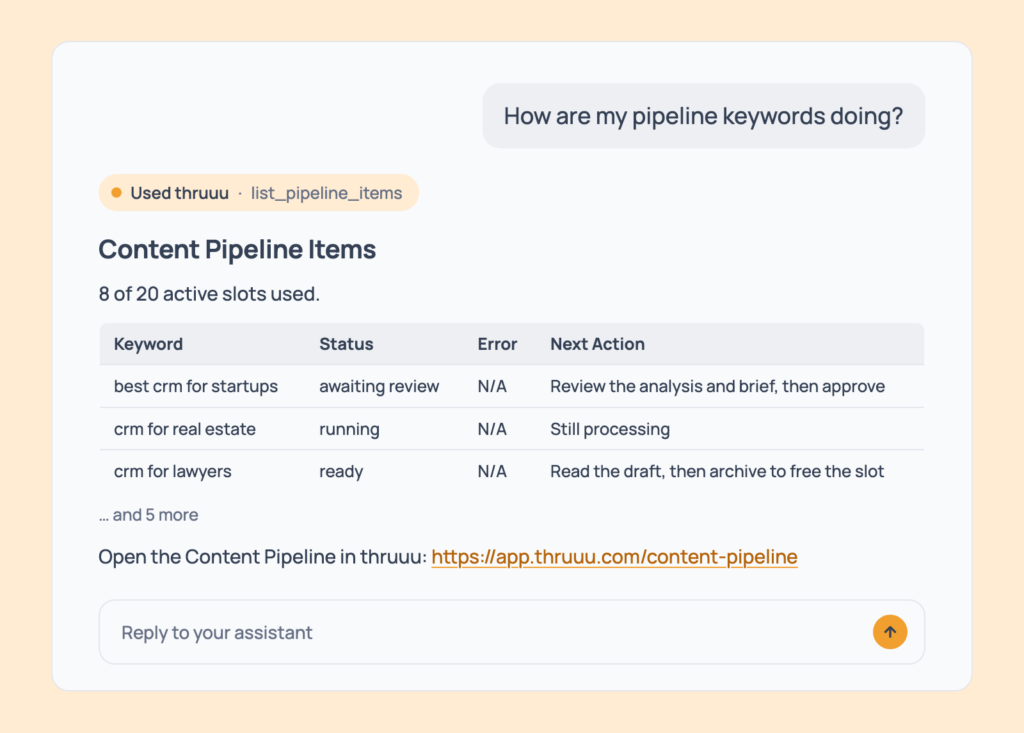
For two keywords or more, the Content Pipeline takes them through SERP analysis, deep analysis, brief and draft in one batch, and stops after the brief so you can review it.
| Tool | What it does | Credits | Minimum plan | Example prompt |
|---|---|---|---|---|
start_draft | Writes a full AI draft from a brief that has an outline | 15 | Professional | “Write a full draft from my ‘how to start a podcast’ brief.” |
list_drafts | Lists your drafts with status, word count and open to-dos | Free | Professional | “Which draft has the most work left?” |
get_draft | Reads the article and the checklist of what to fill in by hand | Free | Professional | “Read the draft for ‘how to start a podcast’.” |
create_pipeline | Sets up a Content Pipeline, once per workspace | Free | Professional. On a team, the account admin creates it | “Set up a Content Pipeline for my workspace.” |
add_pipeline_keywords | Adds and launches up to 20 keywords with one set of choices: market, template, article type, AI engines, Brand Kit | Per keyword: 6 for the analysis, plus 1 per AI engine, plus 1 for search volume, then 5 for the brief | Professional | “Create content for these 10 keywords in the US with my Brand Kit.” |
list_pipeline_items | Shows progress per keyword, items waiting for review, failures and slots used out of 20 | Free | Professional | “Which keywords are waiting for my review?” |
approve_pipeline_brief | Approves a brief at the review gate and starts its draft | 15 per draft | Professional | “Approve the brief for ‘best crm for startups’ and start the draft.” |
archive_pipeline_item | Frees a pipeline slot. The brief and draft stay readable | Free | Professional | “Archive the items whose drafts are ready.” |
The review gate is your step. The brief shapes the draft, so fix the outline and the audience before you approve.
The draft then comes back with a list of what is still yours to do: a stat to source, a claim to check, a link to add, a call to action to write.
No tool edits the draft, so you or your copywriter finish it in your own editor.
Account and setup tools
Five tools tell the assistant what your account can do. It calls them on its own when a request needs a market, a workspace or a Brand Kit.
| Tool | What it does | Credits | Minimum plan | Example prompt |
|---|---|---|---|---|
get_credits | Returns your credit balance, plan and owner status | Free | Every plan | “How many credits do I have left?” |
list_workspaces | Lists your workspaces, with the default marked | Free | Every plan | “Which workspaces do I have?” |
get_serp_parameters | Lists the countries, languages, Google domains, devices and AI engines you can use | Free | Every plan. Free runs fixed settings | “Which countries, languages and Google domains can I search in?” |
list_brand_kits | Lists your Brand Kits and their workspaces | Free | Professional | “Show me my Brand Kits.” |
get_brand_kit | Reads one Brand Kit: identity, audience, positioning, voice, writing rules, style guide and CTA conventions | Free | Professional | “Show me the full Brand Kit for my agency client Acme.” |
How to get started
- Create a free thruuu account.
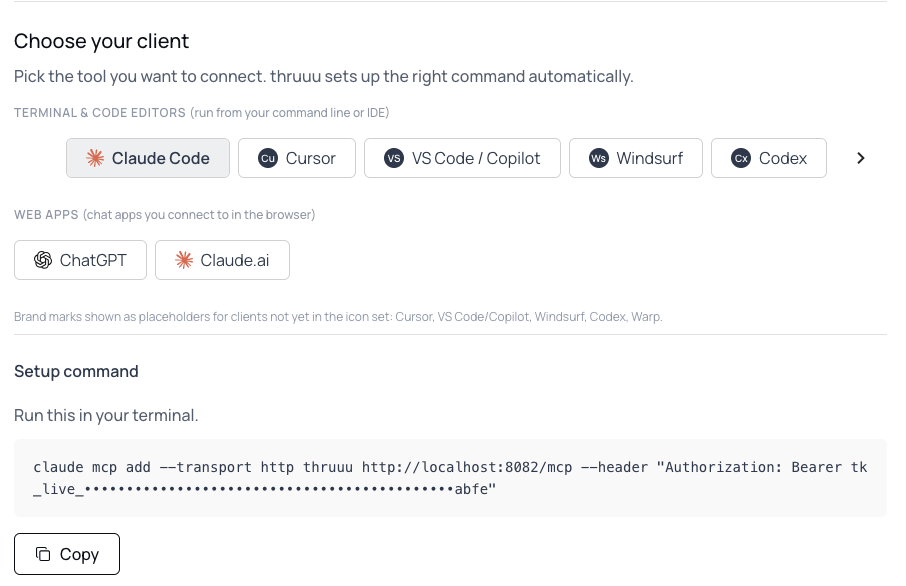
- Connect thruuu. In the app, open API & Bulk Tools → MCP: the page shows your MCP key and the exact setup for each assistant, with your key already filled in. Or paste “Set me up for thruuu using https://app.thruuu.com/agent-setup.md” into your assistant: it asks for your key, then connects itself or walks you through the steps.
- Ask “What is my thruuu credit balance?” to check the connection.
- Ask for a job in plain words, with the keyword and the market.
- Say yes when the assistant states the cost.
The setup guide covers each assistant step by step.
What plan do you need?
The thruuu MCP tools use the same credits as the thruuu app. What each plan adds:
| Plan | What it adds in the MCP |
|---|---|
| Free | SERP analyses and briefs with fixed settings (US, English, desktop, first page) |
| Pay as you go and Starter | Market choice, topic clusters, outlines and brief editing |
| Professional | ChatGPT as an AI engine, AI Overview reports, Brand Kits, outline styles, AI drafts and the Content Pipeline |
| Agency | All four AI engines, the Analysis Agent, brand names in AI answers, AI Overview sub-paths and aliases |
A free trial lets you try the research and AI Search tools. Brand Kits, AI drafts and the Content Pipeline need Professional or Agency.
Tips for getting more from the thruuu MCP tools
- Before you re-run a keyword, ask “Do I already have an analysis for ’email marketing’?” It calls
list_serp_analysesfor free, while a newstart_serp_analysischarges again. - Start the three analyses from the chat:
run_search_intent,run_heading_analysisandrun_content_analysiscost nothing and finish within a couple of minutes. Read the results withget_serp_analysis. - Ask for one section at a time, because
get_serp_analysisloads only what you ask for. Add “Show me the raw data” to get the tables instead of a summary. - For two keywords or more, use the pipeline:
add_pipeline_keywordstakes up to 20 with one set of choices. A keyword you researched earlier is analysed and charged again there. - Before a batch, ask “Can I afford to analyse 20 keywords and write briefs for all of them?” The assistant prices the batch against your credits for free.
- For client work, add “in the Acme workspace” so analyses, briefs and pipelines stay with the right client.
Ready to give your AI assistant live SEO data?
With the thruuu MCP tools, Claude, ChatGPT, Codex or any other MCP client researches, briefs and drafts on your thruuu data, and asks before it spends a credit.